If I need coal price data in 2026, my choice comes down to four source types: government data for free U.S. spot prices, benchmark feeds for API2 and Newcastle, exchange data for futures, and commercial APIs for simple system access.
Here’s the short version:
- EIA gives me weekly U.S. spot coal prices for CAPP, PRB, and Illinois Basin
- Benchmark feeds cover API2, Newcastle API6, and other contract-linked indexes
- Exchange data is for futures, forward curves, OHLC, and risk work
- Commercial APIs pull several series into one REST/JSON setup
That matters because update speed is not the same across sources. One source may update weekly, while another may update about every 12 minutes. If I mix them without checking timestamps, my spreads and dashboards can be off.
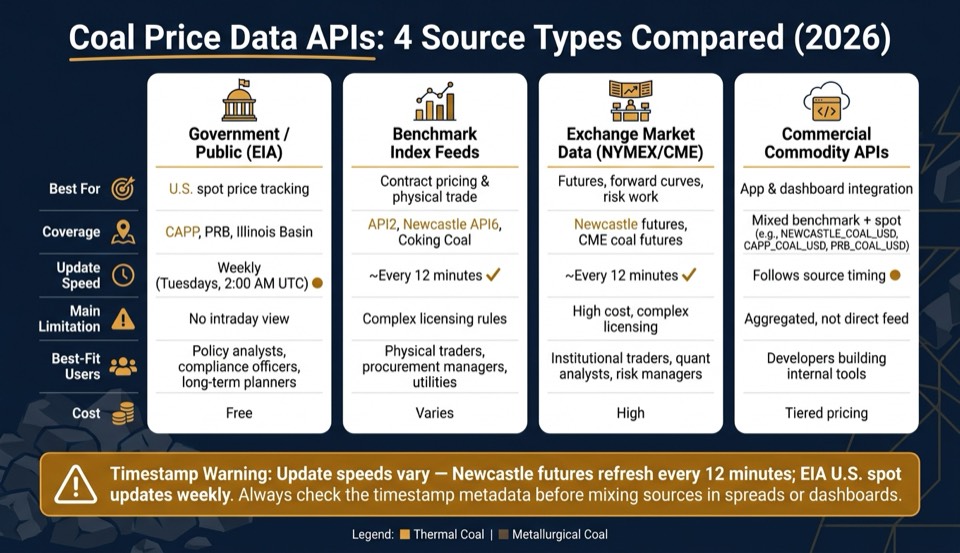
Coal Price Data APIs Compared: Source Types, Coverage & Update Speed (2026)
Quick Comparison
| Source Type | Best For | Main Coverage | Update Speed | Main Limitation |
|---|---|---|---|---|
| Government / public | U.S. spot tracking | CAPP, PRB, Illinois Basin | Weekly | No intraday view |
| Benchmark feeds | Contract pricing | API2, Newcastle API6, coking coal | Source-based, often about every 12 minutes | License rules can be hard to sort out |
| Exchange market data | Futures and risk | CME / NYMEX coal futures | About every 12 minutes | Cost and exchange rules |
| Commercial APIs | App and dashboard use | Mixed benchmark + spot series | Follows source timing | Often aggregated rather than direct |
I’d use EIA for policy and long-range tracking, benchmark feeds for index-linked pricing, exchange data for tradable forward curves, and commercial APIs when I want one endpoint instead of stitching sources together.
That’s the full picture in plain terms, and it’s the main lens I’d use to read the rest of the article.
sbb-itb-a92d0a3
1. Public and Government Coal Price Data Portals
EIA publishes weekly coal spot prices for Central Appalachian, Powder River Basin, and Illinois Basin. These are U.S. spot prices for immediate delivery, not benchmark feeds such as Newcastle or API2.
EIA updates this data every Tuesday at 2:00 AM UTC. Since it updates weekly, it doesn't fit intraday dashboards or fast-moving market views. Put simply: EIA works well for baseline U.S. spot tracking, but not for benchmark or intraday use.
| Basin | Type |
|---|---|
| Central Appalachian (CAPP) | U.S. thermal spot |
| Powder River Basin (PRB) | U.S. thermal spot |
| Illinois Basin | U.S. thermal spot |
Use EIA when you need U.S. spot references. If you need Newcastle or API2, switch to benchmark index feeds.
The data is free, which is a big plus. But there's a catch: it comes through web tables or bulk downloads, so you'll need to parse and normalize it before using it in a dashboard or internal system.
For Newcastle and API2, move to benchmark index feeds.
2. Benchmark Coal Index Feeds for API2 and Newcastle
Use benchmark feeds from commodity data APIs when you need standard reference pricing for contracts and internal models. API2 is the main northwest Europe thermal coal benchmark, so treat it separately from Newcastle API6. Some benchmarks are linked to exchange futures for forward-curve work. If you need exchange-traded pricing for the forward curve, move to futures market data in the next section.
Keep thermal coal and metallurgical coal apart. Newcastle API6 is thermal coal, while coking coal is metallurgical and follows a different pricing setup. That split matters because benchmark indexes, futures, and physical coal grades don't line up one-to-one.
Use these feeds for:
- Contract indexing
- Internal valuation
- Model alignment
| Benchmark | Coal Type | Use Case |
|---|---|---|
| Newcastle API6 | Thermal | Asian power generation contracts |
| API2 | Thermal | Northwest Europe contract indexing |
| Coking Coal | Metallurgical | Steel production pricing |
For access details, use the documented REST endpoint and auth header below:
GET https://api.oilpriceapi.com/v1/prices/latest
Authorization: Token YOUR_API_KEY
See the full API documentation for supported symbols and response fields. Check the source timestamp in the API response, not the time of your request.
3. Exchange Market Data for Coal Futures
If you need a tradable forward curve instead of a spot benchmark, the move is pretty simple: shift from index feeds to exchange futures. That's what makes futures a better fit for forward curves, P&L checks, and risk dashboards.
For thermal coal, pay attention to Newcastle futures and CME coal futures. These contracts update every 12 minutes, while EIA spot data updates weekly on Tuesdays.
| Market | Coal Type | Update Frequency |
|---|---|---|
| Newcastle futures | Thermal | Every 12 minutes |
| CME coal futures | Thermal | Every 12 minutes |
Another plus: exchange data usually arrives as JSON via REST. That makes it easy to plug into dashboards, pricing models, and internal portals.
Before you send futures data into valuation or risk systems, verify the documented symbol and settlement type. That small check can save a lot of cleanup later.
4. Commercial Commodity APIs and Integration Platforms
Commercial commodity APIs come into play when you need coal benchmarks inside dashboards, models, or internal systems without piecing data together from multiple places. For coal, the main thing to check is simple: does the API give you the benchmark, spot series, and archive you need in one schema?
OilPriceAPI is a REST API for live and historical commodity prices. For coal, it includes NEWCASTLE_COAL_USD for thermal benchmark pricing, weekly EIA U.S. spot series for CAPP, PRB, and Illinois Basin, COKING_COAL_USD for metallurgical coal, and NYMEX_APPALACHIAN_USD for discontinued-contract backtesting. If that coverage lines up with your workflow, the next step is making the request.
Use a single GET request:
curl "https://api.oilpriceapi.com/v1/prices/latest" \
  -H "Authorization: Token YOUR_API_KEY"
The JSON response works well for dashboards, reporting tools, and internal systems. If you're setting this up in practice, use the API docs and setup guides for Excel, Google Sheets, Python, and Node.js. You can also find the full list of commodity codes in the API documentation.
With the source access model clear, the next step is to compare which data type fits your workflow best.
Matching Data Sources to Your Workflow
The right source depends on the job you’re doing. Start with the table below, then check timestamp alignment before you combine any series.
| Use Case | Best Source Type | Key Codes | Update Frequency |
|---|---|---|---|
| Backtesting | NYMEX historical archives | NYMEX_APPALACHIAN_USD |
Archived (2004–2016) |
| Daily mark-to-market | Benchmark index feeds | NEWCASTLE_COAL_USD |
Every 12 minutes |
| Policy Analysis | Public/government spot data (EIA) | CAPP_COAL_USD, PRB_COAL_USD |
Weekly (Tuesdays) |
| Internal Tool Integration | Commercial commodity API | NEWCASTLE_COAL_USD, CAPP_COAL_USD, PRB_COAL_USD |
Matches the source cadence |
One detail can trip people up: update timing doesn’t match across sources.
Newcastle coal futures refresh every 12 minutes, while U.S. spot coal prices update weekly on Tuesdays. Before you run spreads or ratios, check the created_at or timestamp metadata in the JSON response. This matters most when you mix weekly U.S. spot data with faster benchmark feeds.
If you’re building internal energy dashboards, stick with standardized codes like NEWCASTLE_COAL_USD for thermal coal. It keeps your integration clean and makes life a lot easier when data moves across teams.
If you work in spreadsheets, pay close attention to the unit field in each API response. That’s what tells you whether U.S. spot prices are quoted in short tons or whether international benchmarks use metric tons.
For a broader look at how these benchmarks fit into the global energy landscape, see our commodity market analysis. The next section breaks down the main tradeoffs.
Pros and Cons of Each Source Type
No source works for every workflow. The table below shows the main tradeoffs so you can match the right tool to the job. For Newcastle and API2 workflows, update cadence and licensing often make the decision.
| Source Type | Key Strengths | Key Limitations | Best-Fit User |
|---|---|---|---|
| Public / Government (EIA) | Official and free | Weekly updates only; limited regional scope; no real-time access | Policy analysts, compliance officers, long-term planners |
| Benchmark Index Feeds | International thermal and metallurgical benchmarks; standard for physical contracts; refreshes as often as every 12 minutes | Often assessments rather than tradable prices; licensing can be complex | Physical traders, procurement managers, utilities |
| Exchange Market Data (NYMEX, CME) | High liquidity; OHLC, volume, settlement | Expensive direct access; complex licensing | Institutional traders, quant analysts, risk managers |
| Commercial Commodity APIs | REST/JSON integration; SDKs for Python and Node.js; multiple benchmarks in a single call | Aggregated, not direct; advanced features may require higher tiers | Developers building coal dashboards and internal tools |
These tradeoffs matter most when you need benchmark coal data inside a dashboard, model, or trading workflow.
EIA is a strong fit for policy, compliance, and long-range planning. But it’s too slow for intraday use. If you need weekly official figures, it works well. If you need fast market moves, it won’t get you there.
Direct CME exchange feeds are a better match for institutional trading and risk work, where timing and market depth matter more. The catch is simple: licensing is more involved, and costs are higher. Historical NYMEX Appalachian archives are also available for backtesting.
Commercial APIs sit in the middle. They’re easier to plug into apps, and that matters when you’re building internal tools under deadline. The main tradeoff is that the data is aggregated, not direct, and advanced features may sit behind higher pricing tiers. For many developers putting coal benchmarks like Newcastle or API2 into internal systems, that tradeoff makes sense.
For reference, OilPriceAPI uses GET https://api.oilpriceapi.com/v1/prices/latest with the Authorization: Token YOUR_API_KEY header. The full request format is in the API documentation.
These tradeoffs lead straight into the source-matching rules in the conclusion.
Conclusion
Public portals work well for official reporting. Exchange data is a better fit for futures and risk tasks. And commercial APIs make the most sense when you need direct system integration.
In practice, choose based on coverage, update cadence, and licensing. Before you move anything into production, double-check all three. Thermal coal and metallurgical coal serve different markets, so they shouldn't be treated as interchangeable. Weekly U.S. spot data also won't cut it for active monitoring. And if you're using a paid data source, confirm the license terms before production use.
For direct integration, use this endpoint:
GET https://api.oilpriceapi.com/v1/prices/latest
Authorization: Token YOUR_API_KEY
Integration guides are available for Python, Node.js, Excel, and Google Sheets. The full endpoint reference is in the API documentation.
Get a free API key at oilpriceapi.com and test it in your workflow.
FAQs
Which source should I use for API2 or Newcastle pricing?
For API2 or Newcastle coal pricing, use NEWCASTLE_COAL_USD. It gives you international thermal coal futures through the OilPriceAPI REST interface.
Use the latest prices endpoint with your API key and the by_code=NEWCASTLE_COAL_USD query. After that, you can pull the data into Excel, Google Sheets, Python, or Node.js.
How do I avoid mixing stale weekly data with faster benchmark feeds?
Use the timestamp metadata in each API response to see exactly when a data point was updated. Then compare that source timestamp with your app’s freshness needs before you use the data.
Handle weekly spot prices, like EIA data, separately from 12-minute interval futures. They move on different schedules, so always check the update cadence for the commodity code you query.
What should I check before using coal price data in production?
Before you put coal price data into production, check two things first: how often the endpoint updates and what source metadata comes with it. That tells you whether the feed matches your app’s needs. You should also confirm whether the number is an official settlement or a reference benchmark. That detail matters more than it might seem, especially if the data feeds trading, reporting, or alerts.
You’ll also want to plan for common API issues. 401 errors usually point to auth problems. 429 means you’ve hit a rate limit. And network timeouts happen now and then, even with solid systems. A simple retry setup with exponential backoff can help you avoid turning a small hiccup into a bigger outage.
If you need the most recent market data, you can pull it from the API’s latest prices endpoint.