If you need oil price data, the short answer is simple: use polling for scheduled reports and dashboards, use webhooks for price alerts that must act fast, and use both if you want alerting plus a fallback check.
I’d boil the whole decision down to this:
- Polling = your system asks for the latest price on a schedule
- Webhooks = the provider sends an update when a trigger happens
- Polling is simpler because you only make outbound requests
- Webhooks cut delay but need a public HTTPS endpoint, signature checks, and duplicate-safe handling
- A hybrid setup gives you event alerts first, then a scheduled sync to fix gaps after downtime
A few points matter most in practice:
- If a dashboard refreshes every 15 to 60 minutes, polling is often enough
- If a price threshold crossing should trigger action right away, webhooks fit better
- Webhooks are usually at-least-once, so duplicate events can happen
- Polling can waste calls if you check often and prices rarely trigger anything
- A fallback poll every 15 to 30 minutes can help restore current state after missed webhook deliveries
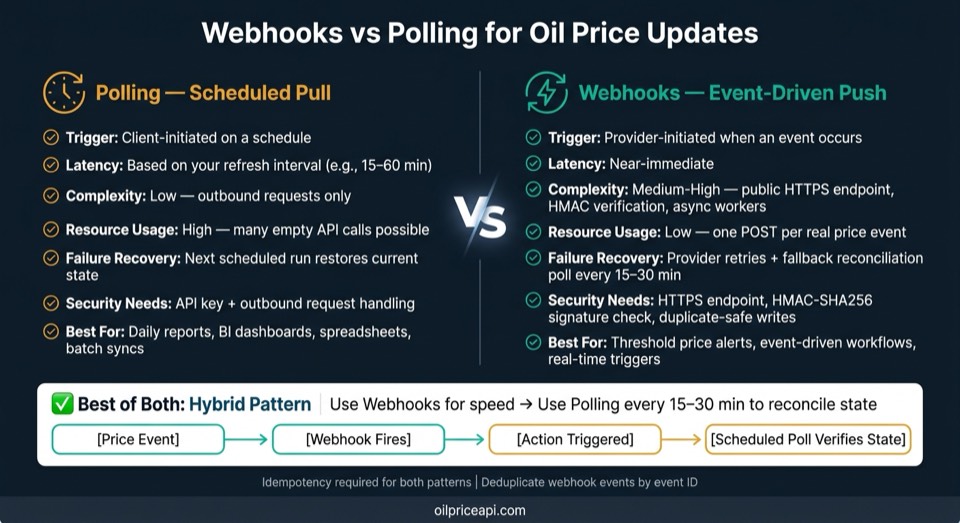
Webhooks vs Polling for Oil Price Data: Key Tradeoffs at a Glance
Polling vs Webhooks | System Design Tradeoffs | Communication Pattern | #systemdesign #softwaredude
sbb-itb-a92d0a3
Quick Comparison
| Criteria | Polling | Webhooks |
|---|---|---|
| How it starts | Your app sends a request on a schedule | Provider sends a POST when an event happens |
| Best for | Reports, spreadsheets, dashboards, batch syncs | Threshold alerts, event-based workflows |
| Setup | Lower setup effort | More moving parts |
| Delay | Based on your schedule | Near-immediate |
| API usage | Can include many empty checks | Only sends when a trigger happens |
| Failure recovery | Next run can catch current state | Retries help; fallback polling should verify state |
| Security needs | API key and outbound request handling | HTTPS endpoint, HMAC verification, duplicate-safe writes |
My takeaway: if you’re unsure, start with polling. If the business cost of waiting until the next refresh is high, move to webhooks or a mixed model.
That’s the core of the article below: how to choose the right pattern, where each one fits, and how to avoid slow updates, duplicate processing, and missed state changes.
When Polling Is the Better Fit
Polling works best when your workflow can live with scheduled updates. In plain English: if the data can wait until the next refresh, polling is often the simpler option.
A Simple Scheduled Setup With OilPriceAPI
The setup is pretty straightforward. A cron job or task scheduler runs on the interval you choose, calls GET https://api.oilpriceapi.com/v1/prices/latest with your API key, stores the response in a local database or cache, and then your dashboards or reports read from that stored data.
If you want the full set of parameters and response fields, check the API documentation. For most internal reports and dashboards, a modest refresh cadence is more than enough.
Good Polling Use Cases: Daily Reports, Dashboards, and Spreadsheets
Polling is a natural match for workflows that already run on a schedule.
A nightly batch job that records WTI and Brent Crude prices for a report doesn't need sub-second delivery. The same goes for internal BI dashboards that refresh hourly, fuel cost trackers updated each morning, and analyst tools that pull daily snapshots for trend analysis.
Spreadsheet setups are an especially clean fit here. A scheduled macro or data connector in Excel or Google Sheets can call the API on a fixed interval and fill a table without much fuss.
Polling Reliability: Retries, Backoff, and Missed-Poll Recovery
Polling has one big advantage: if a run fails, the next successful run gets you back on track.
A few habits help a lot:
- Respect
429responses - Use exponential backoff
- Set a request timeout
- Make writes idempotent
That last point matters more than it sounds. A UNIQUE constraint on the combination of timestamp and commodity code stops duplicate rows if a retry sends the same record again.
Also, persist your last-synced checkpoint after a successful write, not before. If the system crashes in the middle of a cycle, the next run can resume cleanly instead of skipping data.
If your system is down long enough to miss several cycles, a manual backfill with historical data is a clean way to recover.
One practical rule: don't poll every few seconds unless the workflow actually needs that pace. Match the interval to the business cadence.
When the workflow needs immediate notification instead of scheduled reads, webhooks are the better fit.
When Webhooks or Alerts Are the Better Fit
When scheduled reads are too slow, webhooks push price changes straight into your workflow. Use them when the price change itself needs to kick something off.
Event-Driven Use Cases for Oil Price Changes
Webhooks make the most sense for threshold-based logic. If WTI or Brent crosses a set price level, your system can react right away - by recalculating pricing rules or sending an internal alert - instead of waiting for the next poll. In this setup, the event drives the workflow, not the clock.
These are event-only triggers, so notifications fire only when the condition is met. That cuts wasted processing when nothing has changed. One thing to watch: alert fatigue. If prices bounce around the same threshold, a cooldown window - say, 60 minutes - can keep alerts from piling up. Of course, fast delivery only matters if the receiving system is secure and can respond fast.
Webhook Consumer Design: Secure Endpoints and Safe Processing
Your webhook consumer needs a public HTTPS endpoint. For every request, verify the HMAC-SHA256 signature against the raw request body - not a parsed and re-serialized JSON object, because even small formatting shifts can break signature validation.
The safe pattern is simple:
- Verify the signature on the raw request body
- Enqueue the event
- Return
200 OKright away
Run business logic out of band, not inline. That keeps the handler fast and helps you avoid provider timeouts and extra retries.
Webhook Reliability: Retries, Idempotency, and Recovery Checks
Webhook delivery is at-least-once, not exactly-once. So yes, duplicates can happen. Your consumer should deduplicate by event ID and enforce a unique constraint in the database. Deduplication and the write should happen in one transaction.
Retries help, but they don't solve everything. Webhooks can still miss events during outages or after retry windows expire. A good setup uses the webhook as the main trigger and a scheduled poll as a verification sweep. That reconciliation step should call GET https://api.oilpriceapi.com/v1/prices/latest and upsert the current state into your local store.
The point isn't to replay every past event. It's to restore the current state.
Webhooks vs Polling: Side-by-Side Tradeoffs
Latency, Complexity, and Control Over Timing
Polling gives you control over timing. You decide when to call the API, how often to do it, and how to handle the response. That makes polling easy to test. It also fits systems behind corporate firewalls or private VPCs that block inbound connections.
Webhooks work the other way around. The provider sends an event to your endpoint when a price update happens, so your system reacts in the moment instead of checking on a set schedule. To do that safely, you need a public HTTPS endpoint, signature verification, and async processing.
Webhooks cut delay. Polling keeps inbound setup simpler.
There’s also a big difference in request volume. If you poll every few minutes just to catch a small number of daily price events, you’ll send a lot of requests that come back with nothing new. Webhooks only send one POST when a real event happens. On a rate-limited plan, that gap can hit hard.
So don’t judge these two patterns on latency alone. Look at how they affect day-to-day operations too.
| Criteria | Polling (Scheduled Pull) | Webhooks (Event-Driven Push) |
|---|---|---|
| Trigger Model | Client-initiated on a schedule | Provider-initiated on an event |
| Complexity | Low - outbound requests only | Medium-high - public endpoint, security, async workers |
| Resource Usage | High - many empty API calls | Low - one POST per real event |
| Retries | Next run recovers missed reads. | Provider retries, then reconciliation closes gaps. |
| Idempotency | Handled via cursors or sequence IDs | Mandatory - deduplicate by event ID |
| Missed-Event Recovery | Next run recovers missed reads. | Provider retries, then reconciliation closes gaps. |
A Hybrid Pattern: Alerts for Speed, Polling for Reconciliation
In production, this usually isn’t an either/or choice.
A hybrid setup lets webhooks handle the fast path. They can trigger pricing recalculations or internal alerts the moment a threshold is crossed. Then a scheduled reconciliation poll every 15–30 minutes calls GET https://api.oilpriceapi.com/v1/prices/latest and syncs the current state into your local store .
Use webhooks when speed matters. Use polling to recover and line state back up.
The API should stay your source of truth. Polling is there to reconcile state, not to replay history.
That’s why it helps to keep one idempotent state-sync path that both webhook handling and reconciliation polling share.
Implementation Notes for US-Based Systems and Conclusion
After you’ve picked the delivery model, the next step is making sure the output fits U.S. dashboards and reports.
Before production, normalize data for U.S.-facing systems. Show prices in USD with a dollar sign and thousands separators, like $1,250.75. Format dates as MM/DD/YYYY and local times as 10:30 AM ET. If your source data comes in UTC, convert it to Eastern Time before display.
Then map each commodity to the unit your downstream system expects.
| Commodity | U.S. Unit | Example code |
|---|---|---|
| Crude oil | Barrels (bbl) | WTI_USD |
| Diesel or gasoline | Gallons | DIESEL_USD |
| Natural Gas | BTU / MMBtu | NATURAL_GAS_USD |
| Marine Fuel | Metric Tons (MT) | VLSFO_USD |
Once formatting and units are locked in, wire up the client and verify the request contract in the API documentation. If you want sample code, start with the Python or Node.js tutorial. After that, double-check the request details in the API documentation.
Key Takeaways and Next Steps
Use this rule:
- Use polling for scheduled reports, dashboards, and batch jobs.
- Use webhooks for immediate threshold alerts.
- Use both when you need fast alerts plus reconciliation after outages or deployments.
Get a free API key at https://www.oilpriceapi.com
FAQs
How often should I poll for oil price updates?
It comes down to what you need the system to do.
For batch jobs, internal reporting, or historical analysis, polling is often enough. It also tends to hold up better when network issues pop up.
If you need real-time alerts or an immediate action when a price hits a certain threshold, webhooks make more sense.
For intermittent or daily tasks, schedule polls around your business cadence. That keeps things simple and avoids extra strain on your setup. High-frequency polling should be the exception, not the default, since it puts more load on servers and uses more bandwidth.
When should I use both webhooks and polling together?
Use both in production when you need speed and reliability. Think of webhooks as the fast lane for near-real-time updates, while periodic polling acts as your backup check to catch anything missed during downtime or network hiccups.
Use webhooks for low-latency, event-driven reactions. Use polling to keep your source of truth in sync, deal with retries, and recover missed events if your webhook receiver goes down.
How do I safely handle duplicate webhook events?
Make your system idempotent. Many providers use at-least-once delivery, which means the same event can show up more than once.
Push incoming events to a durable queue and return HTTP 200 before you run business logic. Then store processed event IDs in a database or cache so you can spot duplicates and skip them.
Also, use atomic updates or timestamp checks. That way, an older event doesn’t come in late and overwrite newer data.