If your alert is late, the delivery channel is not the first problem. I’d start with the alert path itself: price check → threshold rule → message sent. Then I’d match the channel to the job: email for awareness, SMS for urgent human response, and webhook for system action.
Here’s the short version:
- Polling is simple, but alerts can lag until the next check
- Event-driven flows send alerts as soon as your system detects the rule hit
- Email is best when I want context, history, and a written record
- SMS is best when someone must see it within minutes
- Webhook is best when another system should act right away
- A common setup is webhook first, then email for visibility, and SMS only for high-severity cases
One key fact from the article: core benchmark prices are updated every five minutes during market hours. So even a clean delivery setup can still feel slow if the check interval is too loose.
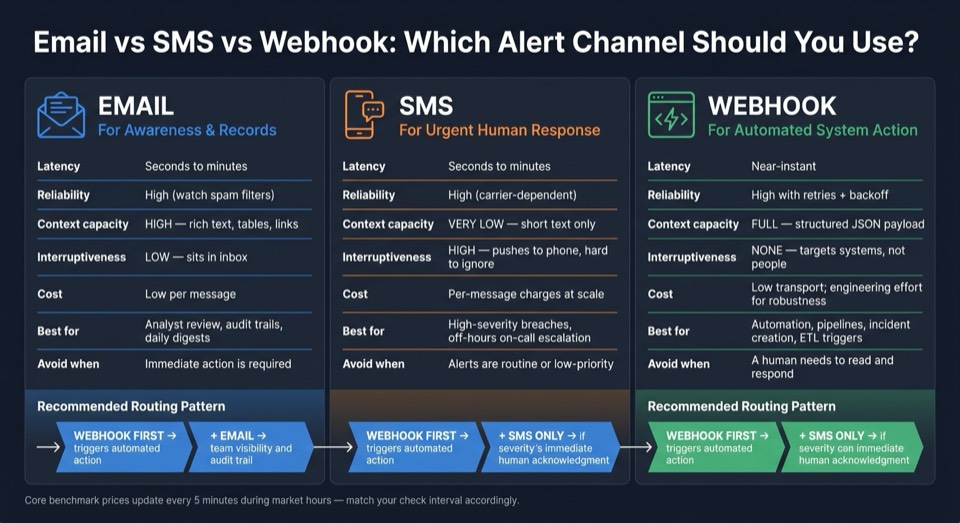
Email vs SMS vs Webhook: Commodity Price Alert Channel Comparison
Quick Comparison
| Item | Best for | Speed | Main limit |
|---|---|---|---|
| Polling | Simple monitoring | Delayed by check interval | More API calls over time |
| Event-driven | Fast response | Near-instant after detection | More setup work |
| Team updates, digests, audit trail | Seconds to minutes | Easy to miss in inbox | |
| SMS | High-severity alerts | Seconds to minutes | Low message space, higher cost |
| Webhook | Automation and internal systems | Near-instant | Needs retries, logging, and endpoint handling |
If I were setting this up from scratch, I’d use polling + email first for low-priority alerts. Then, if a threshold breach needs machine action or off-hours escalation, I’d move to webhook + SMS with deduplication, retries, cooldowns, and UTC-based timestamps.
That’s the full decision in plain English: pick the channel based on who acts next - person or machine - and how fast they need to act.
sbb-itb-a92d0a3
2. Polling with threshold checks vs event-driven alert delivery
Polling and event-driven designs shape two things: how fast an alert goes out and how many API calls you burn through. Once OilPriceAPI gives you the latest price, the next decision is simple: how often should you check it? No matter which path you take, the flow stays the same: latest price → threshold check → delivery.
Polling is simple but adds delay and uses extra requests
Polling is the straightforward option. A scheduled job runs on a set interval, calls GET https://api.oilpriceapi.com/v1/prices/latest with your Authorization: Token YOUR_API_KEY header, compares the returned price to a stored previous value or a fixed threshold, and sends an alert if the condition is met. You can do this with a scheduler and a loop. No extra infrastructure needed.
The downside is timing. If the price crosses a threshold right after a poll, your alert sits there until the next cycle. For a daily digest or an internal dashboard, that's usually fine. But if your workflow needs to react to price movement right away, that gap becomes a problem.
There's also the request cost. Every polling cycle uses an API call whether the price changed or not. So usage grows in a straight line with polling frequency and the number of instruments you're watching. Poll too often, and those requests stack up fast.
Event-driven delivery is better when alerts must trigger action right away
Event-driven delivery flips the model. Instead of asking on a schedule, did anything change?, the system treats a threshold crossing as an event and pushes it downstream the moment it sees it. That's what makes near-real-time response possible.
For developer-owned workflows, webhooks are a practical way to do this. When a condition is met, your alerting service sends an HTTP POST to a developer-controlled endpoint with the event data needed for the next step. That could mean kicking off an internal process, notifying another service, or starting an automated trade review.
The catch? This setup asks more from you. You need a public endpoint, retry logic, and error handling. It takes more work up front. But when the next step is automatic, that extra setup often makes sense.
| Dimension | Polling | Event-driven |
|---|---|---|
| Implementation complexity | Low - cron job or scheduled loop, no extra infrastructure | Moderate to high - requires an endpoint, queue, and retry logic |
| Request usage | High - every cycle consumes a request, even with no price change | Efficient - requests fire only when conditions are met |
| Latency | Bounded by the interval - a condition can wait until the next check | Near real-time - events push as soon as conditions are detected |
| Scaling behavior | Linear - more instruments or higher frequency means more requests | Decoupled - add consumers without increasing polling load |
| Best-fit scenarios | Informational alerts, digests, dashboards | Automation, high-severity conditions |
With detection timing set, the next section looks at email, SMS, and webhook delivery.
3. Email vs SMS vs webhook: delivery channel tradeoffs
The next step is deciding where the alert should go. That choice matters more than it may seem at first. Pick the wrong channel, and you either miss alerts or annoy people until they start tuning them out. It also shapes who sees the alert, how fast they see it, and whether a human or a system takes the next step.
Here’s the quick view:
| Dimension | SMS | Webhook | |
|---|---|---|---|
| Latency | Seconds to minutes; delivery can be delayed by spam filters or server queues | Seconds to minutes | Near-instant once the condition is met |
| Reliability | High, but vulnerable to spam filters and inbox rules | High, but carrier- and device-dependent | High with retries, backoff, and error handling |
| Context capacity | High - rich text, tables, links, and global oil market price history | Very low - short text only, one key fact | Fully structured - JSON payload with full metadata |
| Interruptiveness | Low - sits in inbox until checked | High - pushes to phone and is hard to ignore | None - targets systems, not people |
| Cost | Low marginal cost per message | Per-message or per-segment charges add up at scale | Low transport cost; engineering cost for robustness |
| Integration fit | Analyst review, audit trails, daily recaps | On-call escalation, high-severity human alerts | Automation, internal services, pipelines, databases |
A good rule of thumb: start with the least urgent channel.
Email works best for low-urgency alerts that need a record
Email is the right fit for low-urgency alerts when people need context, links, and a paper trail. It handles structured tables, price deltas, and links to dashboards well. It also works nicely with Excel-embedded price feeds and Google Sheets reports.
Think of email as a report channel, not a pager. If a threshold gets crossed several times, don’t fire off one email for each event. Group low-urgency items into digests so people can scan them in one place.
SMS works best for urgent alerts that need fast human attention
SMS is hard to ignore. It lands on a phone, often with sound and vibration, and cuts through the noise fast. That makes it a fit for narrow, high-severity alerts that need immediate human attention.
Keep the message tight and useful. Include:
- what happened
- why it matters
- a link to the right dashboard
If the alert reads like a mini report, it probably doesn’t belong in SMS.
Webhook works best for automation, not for people
Webhooks are for systems talking to systems. When your alerting service spots a condition in data from GET https://api.oilpriceapi.com/v1/prices/latest, it can send a structured JSON payload to an internal endpoint. That endpoint can then open a ticket, trigger an ETL job, write a price event to a database, or kick off a re-pricing workflow.
In plain English, a webhook is what you use when no person needs to stop and read the alert first.
To make webhook delivery dependable, use retries, idempotency, signature checks, and logging.
4. How to pick the right channel based on alert severity and workflow
Pick the channel based on severity, urgency, and what needs to happen next. Email is for awareness. SMS is for interruption. Webhook is for machines. From there, use a routing pattern to decide when to combine channels instead of forcing a one-channel choice.
Use email for informational and digest-style alerts
Email works best as the default for alerts that people can review during normal business hours or in a scheduled digest. That includes non-critical threshold crossings, end-of-day summaries, and alerts that need a bit more context.
Use email when people need background and a written record. And instead of sending one email for every single threshold crossing, group related events into one digest. It cuts the noise and makes the signal easier to spot.
Use SMS only for narrow, high-severity conditions
SMS should stay rare. Save it for cases where someone needs to act within minutes, like a sharp price move past a critical threshold during off-hours or an overnight breach that an on-call operator has to handle.
If SMS becomes routine, people start tuning it out.
Set clear guardrails around it:
- Use quiet hours
- Deduplicate alerts
- Define an escalation chain
That chain should spell out who gets the first message, how long they have to respond, and who gets pinged next. If the alert doesn't call for immediate human action, send it to email or webhook instead.
Use webhook when a machine should act next
Webhook is the right fit when no person needs to read the alert first. If your price check spots a threshold crossing, a webhook can push that event into an internal system or open a ticket right away, without waiting for human review.
A simple pattern works well here: use webhook as the main trigger for any automated action, then add email or SMS only when a person also needs to know. For example, a price threshold crossing can fire a webhook to update an internal system, send an email to the right team for visibility, and send SMS only if the move is severe enough to need immediate acknowledgment.
That gives you a practical way to apply routing in production.
| Alert class | Channel | When to use |
|---|---|---|
| Informational | Non-critical crossings, daily summaries, trend reviews | |
| Urgent | SMS | High-severity breaches, off-hours events, on-call escalation |
| Automated action | Webhook | System sync, incident creation, pipeline triggers |
| Urgent + automated | Webhook + SMS | Machine action required and a human must also be informed |
5. Build checklist and final recommendation
Start with polling.
For low-urgency monitoring, polling plus email is a solid first setup: run a scheduled job against the latest prices endpoint, set static thresholds, send alerts by email only, and add a cooldown window so the same alert doesn't keep firing.
When alerts need to drive action faster, shift from polling to a webhook-first setup.
As urgency goes up and automation becomes part of the flow, split channels by job. If a threshold breach needs to trigger an automatic action, webhook should be the first channel in the path. Then add email for context and SMS for escalation. That mix helps keep the system dependable when it matters most.
Before you ship to production, check these safeguards:
- Retries: Use exponential backoff for each channel. Give webhooks more retries than SMS. Webhooks kick off downstream actions, while duplicate SMS messages can add extra cost.
- Deduplication: Track alert state by rule and recipient. Trigger alerts only when the state changes, and use a hysteresis band to stop back-and-forth firing when prices hover near a threshold.
- Logging: Log the rule, price, severity, trigger result, delivery status, retry count, and timestamp for every alert decision and every delivery attempt.
- Time-zone handling: Store all timestamps in UTC inside the system, then format them for the recipient’s local U.S. time zone as MM/DD/YYYY hh:mm AM/PM TZ. Test around daylight saving time changes.
Treat your alerting system like any other critical service. Watch bounce rates and webhook latency for spikes. Use a dead-letter queue for webhook events that run out of retries.
The full API reference is at https://www.oilpriceapi.com/api-documentation. If you're building in Python or Node.js, the Python tutorial and Node.js tutorial walk through the integration from start to finish. Get your free API key at https://www.oilpriceapi.com and start with the simplest version that works - then build from there.
FAQs
How often should I poll for price changes?
For time-sensitive alerts, avoid polling when you can and use webhooks instead. They send updates as prices change, which cuts latency and helps you avoid constant polling.
If polling is your only option, set the interval based on the job you need it to do. Most commodity prices update every 5 minutes. For non-critical dashboards or reporting, polling every 1 to 4 hours is usually enough.
When should I use webhook plus SMS together?
Use webhooks and SMS together for immediate, high-priority alerts when the market makes a critical move and someone needs to act fast.
Here’s the simple split:
- Webhooks send the alert to your server in real time.
- SMS gets the message to people fast, even when they’re not sitting in front of a dashboard.
That combo works well when speed matters on both sides: your system can react at once, and your team can see the alert right away.
How do I prevent duplicate price alerts?
OilPriceAPI includes built-in event deduplication for webhooks. You should still verify HMAC-SHA256 signatures so you only process valid requests and avoid replayed alerts.
If you're building a custom listener, track unique event IDs and ignore repeated payloads. In tools like Zapier or Make, use filters so alerts fire only when thresholds are met or when values change.