Jet fuel can account for 25%–35% of airline costs, and prices can shift 10%–20% in a few weeks. If I need jet fuel price data that I can actually use in software, the short answer is simple: I should map the right regional benchmark, verify it against the matching live page, and pull it through the API with the correct Authorization: Token header.
Here’s the article in plain English:
- I should use US Gulf Coast Jet for North America and Jet A
- I should use Jet A-1 Europe for Europe and global Jet A-1 pricing
- I should use Singapore Jet Kerosene for Asia-Pacific
- I should check the matching live page before I automate anything
- I should pull data from
GET https://api.oilpriceapi.com/v1/prices/latest - I should store the API key server-side, not in frontend code or sheets cells
- I should watch the timestamp, not just the price
- I should store prices as numeric values and keep time in UTC
- I should use hourly refresh for most dashboards, and 5 to 30 minutes for intraday use
A lot of teams get tripped up by one simple issue: they mix the wrong region with the wrong benchmark. That leads to bad checks, bad reports, and bad fuel cost inputs.
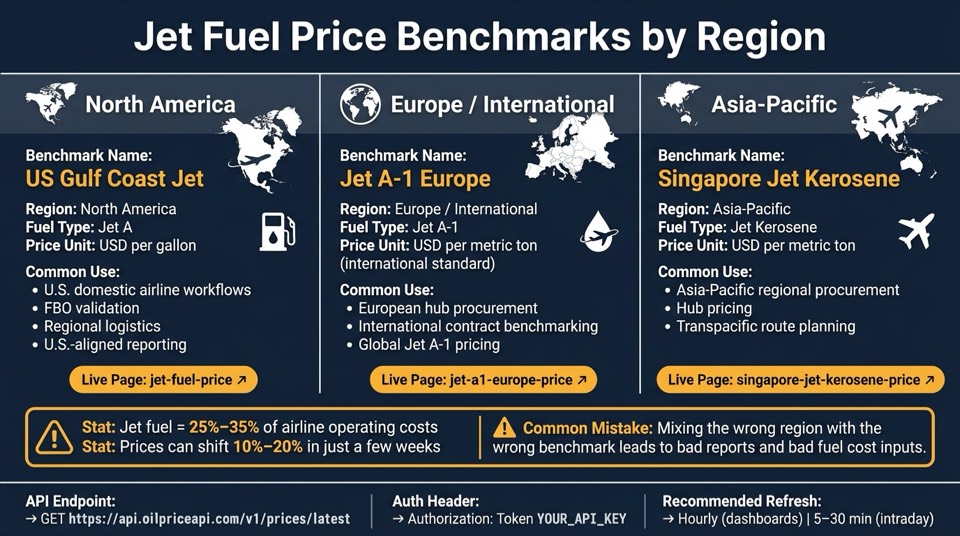
Jet Fuel Price Benchmarks by Region: Which API Data Source to Use
Quick comparison
| Benchmark | Region | Fuel Type | Main Use |
|---|---|---|---|
| US Gulf Coast Jet | North America | Jet A | U.S. airline, FBO, and reporting use |
| Jet A-1 Europe | Europe / international | Jet A-1 | European hub pricing and contract checks |
| Singapore Jet Kerosene | Asia-Pacific | Jet Kerosene | Regional buying and hub pricing |
I’d treat this article as a setup guide: pick the right benchmark, match it to the right live page, then move that same series into the API so dashboards, models, and internal tools all use the same price source. For technical implementation details, see our API FAQ.
sbb-itb-a92d0a3
Where jet fuel price data comes from and which benchmarks matter
Jet fuel prices in data feeds are not retail pump quotes. They reflect market trading and price reporting for a given region.
That matters because benchmarks give developers and analysts one standard regional price they can use for procurement, surcharges, and route models.
US Gulf Coast Jet as the North American reference
US Gulf Coast Jet is the North American benchmark for Jet A, U.S. procurement, and U.S.-aligned reporting. Prices are quoted in USD per gallon, which lines up with standard U.S. fuel reporting and contract conventions.
Jet A-1 Europe and Singapore Jet Kerosene for international coverage
Jet A-1 Europe covers European and global Jet A-1 pricing. Singapore Jet Kerosene covers Asia-Pacific procurement and hub pricing.
Use the benchmark that fits the region, fuel standard, and business use case:
| Benchmark | Primary Region | Fuel Standard | Common Business Use Case |
|---|---|---|---|
| US Gulf Coast Jet | North America | Jet A | U.S. domestic airline workflows, regional logistics, and U.S.-aligned reporting |
| Jet A-1 Europe | Europe / International | Jet A-1 | International aviation fuel pricing, European hub operations, and global contract benchmarking |
| Singapore Jet Kerosene | Asia-Pacific | Jet Kerosene | Asia-Pacific regional procurement and hub pricing |
These are the same regional benchmarks shown on the live pages and in the API. Use the live page and API feed that match the same region and fuel standard.
Live jet fuel price pages and how to use them
Use the matching live page to check the benchmark before you wire it into dashboards or internal tools. These pages are handy for manual checks, direct links in internal portals, and procurement review.
Jet fuel live page for general tracking
The main live page at oilpriceapi.com/live/jet-fuel-price tracks the US Gulf Coast Jet benchmark. Prices appear in USD per gallon.
If the feed value matches the live page, your benchmark mapping is set up the right way. If it doesn’t, look at the timestamp in the API response. A price that hasn’t moved during quiet market hours isn’t always stale, but a timestamp mismatch is something you should check.
Jet A-1 Europe and Singapore Jet Kerosene live pages
The Jet A-1 Europe live page covers European hub procurement and international contract benchmarking. The Singapore Jet Kerosene live page covers Asia-Pacific regional logistics and hub pricing.
| Region | Benchmark Name | Live Page | Typical Use |
|---|---|---|---|
| North America | US Gulf Coast Jet | jet-fuel-price | U.S. domestic tracking, FBO validation, regional airline workflows |
| Europe | Jet A-1 Europe | jet-a1-europe-price | European hub procurement, international contract benchmarking |
| Asia-Pacific | Singapore Jet Kerosene | singapore-jet-kerosene-price | global oil market reference, regional logistics, transpacific route planning |
Don’t mix regions. For example, if you use the US Gulf Coast Jet page to check an Asia-Pacific procurement model, you’ll get a mismatch. Once the live page lines up with your benchmark, use that same series in the API feed for automated pulls.
API access: pulling jet fuel prices into dashboards and internal tools
Request pattern and official documentation
Once you move from checking the live page by hand to automating the job, use the API to pull the same benchmark series. Send a GET request to https://api.oilpriceapi.com/v1/prices/latest and pass your API key in the header:
Authorization: Token YOUR_API_KEY
One small detail matters here: the prefix is Token, not Bearer.
Also, keep the API key out of your source code. Put it in environment variables or a secrets manager instead. That saves you from the headache of leaked keys later.
The response comes back as JSON and includes the price, currency, and a timestamp. Check that timestamp so you know the data is recent enough for your workflow.
For supported symbols, filters, and response fields, use the official API documentation. Don’t guess at parameters or make up commodity codes. The docs are the source of truth for what the API supports.
Code example and common integration uses
Before you plug this into your app, test it with curl:
curl -X GET "https://api.oilpriceapi.com/v1/prices/latest" \
  -H "Authorization: Token YOUR_API_KEY"
When you add the request to production code, wrap it in a function with a timeout, handling for non-200 responses, and exponential backoff retries. That extra bit of care can save a lot of pain when a request fails at the worst time.
This setup works well for a few common use cases:
- Dashboards can poll on a schedule and show the latest benchmark.
- Internal tools can apply contract logic before display.
- Finance teams can store daily values for cost and hedging models.
If you want language-specific examples, check the Python and Node.js tutorials.
Implementation notes and conclusion
Authentication, refresh frequency, and data formatting for U.S. systems
Once the API is wired in, focus on three things: security, refresh cadence, and data formatting. After you map US Gulf Coast Jet, Jet A-1 Europe, or Singapore Jet Kerosene the right way, these settings shape how the feed works in production.
Store your API key server-side in an environment variable such as OILPRICEAPI_TOKEN, and read it from your backend. Keep it out of worksheets, frontend code, and public repos. It also helps to use separate dev and production keys.
For refresh frequency, hourly is a practical default for most internal dashboards. If you're making intraday pricing decisions, use a 5- to 30-minute refresh. For planning and budgets, daily refreshes usually do the job.
When the data lands in your system, store timestamps in UTC and convert to local time only when you display them. Format dates as MM/DD/YYYY HH:mm, and keep prices as numeric fields with U.S. separators like 12,345.67. Store product, benchmark, and region as separate fields. Also keep raw and converted values separate.
Spreadsheet and code-based workflows, plus final takeaways
For teams still prototyping, spreadsheets are the fastest way to get a benchmark feed up and running. They work well for test pulls before you move the same logic into code. Use the Excel guide and Google Sheets guide to pull benchmark data without backend code.
A couple of small setup habits go a long way:
- In Sheets, store your API key in Script Properties instead of a cell.
- In Excel, set a refresh interval of about 60 minutes and let downstream formulas read from a single query table.
Once your pricing logic settles down, or when multiple systems need the same data, move to a code-based integration. The Python tutorial and Node.js tutorial show the same request pattern in backend services. For the exact request format, check the API documentation.
Use spreadsheets for prototyping and code for production automation:
| Spreadsheet (Excel / Google Sheets) | Code-based (Python / Node.js) | |
|---|---|---|
| Setup time | Minutes | Hours |
| Best for | Prototyping, ad hoc analysis, small teams | Production dashboards, portals, automated surcharges |
| Automation | Manual or basic scheduling | Fully automated, event-driven |
| Security | Key in Script Properties or a server-side secret store | Key in environment variables or secrets manager |
| Maintenance | Higher manual effort | Lower ongoing effort |
Before you ship, validate the benchmark, refresh schedule, and field formatting end to end. Anchor every internal price to a named benchmark - US Gulf Coast Jet, Jet A-1 Europe, or Singapore Jet Kerosene - and document which operational fuel grade it maps to.
You can also use the live pages as a quick gut check against your data feeds:
Build your API integration with secure token handling, a sensible refresh schedule, and consistent en-US formatting for dates, numbers, and currency.
Get a free API key at oilpriceapi.com, then test your first request with GET https://api.oilpriceapi.com/v1/prices/latest plus Authorization: Token YOUR_API_KEY. That gives you the response structure up front, which makes the rest of the build a lot smoother.
FAQs
Which jet fuel benchmark should I use for my region?
Choose the benchmark based on where you operate and the fuel grade you need. In the United States, Jet A is the standard benchmark. For international routes and global hubs, Jet A-1 is the recognized international standard.
OilPriceAPI provides data for both needs, including major airport prices and broader market benchmarks. You can pull the latest data from the base endpoint with your authorization token.
How do I confirm the API data matches the live benchmark page?
Compare the API response metadata, not just the price. Look at each record’s created_at timestamp and source field to make sure you’re seeing the latest assessment for that benchmark.
That extra check matters because market hours, public holidays, or flat trading periods can make a price look current when it isn’t. Then cross-check that metadata against the matching live page to confirm your application is pulling the data version you expect.
How often should I refresh jet fuel prices in production?
In production, refresh jet fuel price data every 5 minutes to stay aligned with market updates. OilPriceAPI updates prices every 5 minutes during active market hours, which helps dashboards and logistics systems reflect current benchmarks like US Gulf Coast Jet, Jet A-1 Europe, and Singapore Jet Kerosene.
Use the latest prices endpoint, and check the timestamp in each response to confirm the data is current.