If you want the right local oil price, start with the USD quote, convert the unit first, apply the FX rate from the same time, and round only once at the end.
That’s the whole process. And it fixes the most common errors I see: mixing old FX with new oil quotes, rounding too early, and blending barrel, gallon, and liter math across separate steps.
Here’s the short version:
- I start with WTI or Brent in USD per barrel
- I convert the unit first:
- 1 barrel = 42 U.S. gallons
- 1 barrel ≈ 158.987 liters
- I apply the USD → local currency rate from the same timestamp
- I keep the raw price, FX rate, timestamps, and rounding rule together
- I format the final value for en-US, like $1,234.56
A simple example:
- Oil quote: $84.00 per barrel
- Per gallon: $84.00 ÷ 42 = $2.00
- If USD/CAD at that same time is 1.37
- Local result: $2.00 × 1.37 = C$2.74 per gallon
- Then I round for display once
The main point: the math is easy, but the timing and order decide whether the answer is right.
To keep conversions clean, I use one calculation path, store full-precision values, avoid floats for money, and separate calculation from display.
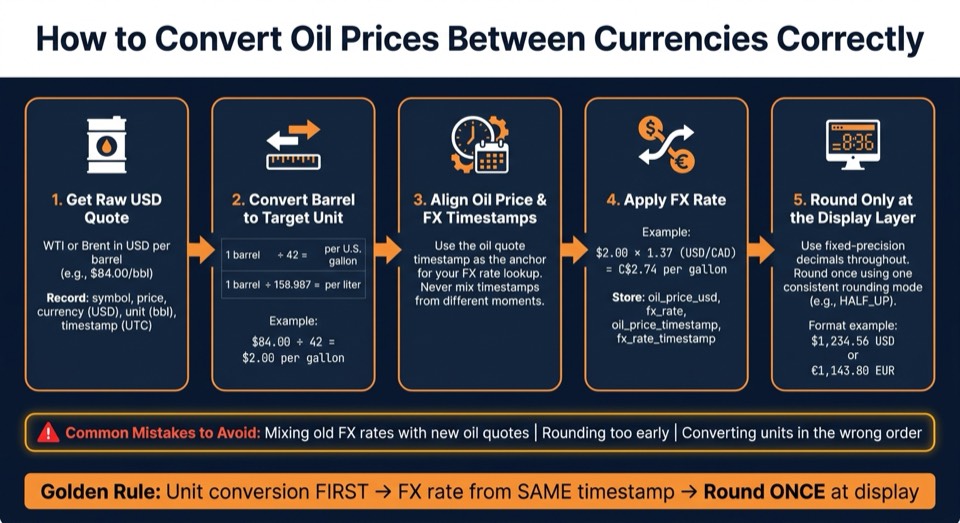
How to Convert Oil Prices Between Currencies: Step-by-Step
Start with USD benchmarks and the right unit
Use USD per barrel as your source price
Start with the raw USD benchmark, not a local-currency number that was converted earlier. If you use a preconverted price, you can end up carrying old FX mistakes or unit mix-ups all the way through.
Before you convert anything, keep the full original quote in one record:
- symbol - for example,
WTI_USDor[BRENT_CRUDE_USD](https://blog.oilpriceapi.com/p/brent-crude-origin) - price
- currency -
USD - unit -
bbl - timestamp - in UTC
Keep those fields together until the output layer. Split them only when you render the final display.
Convert units before mixing barrel, gallon, and liter displays
The volume math is straightforward: 1 barrel = 42 U.S. gallons and 1 barrel ≈ 158.987 liters. So if you want a per-gallon price, divide the USD-per-barrel quote by 42. If you want a per-liter price, divide by 158.987. Then leave rounding until the display layer.
| Display unit | Conversion from 1 bbl |
|---|---|
| U.S. gallons | ÷ 42 |
| Liters | ÷ 158.987 |
If you also need to show the quote in a local currency, do the FX step after the unit conversion. And use the same timestamp for both. That part matters more than people think.
Barrel-to-tonne conversion is a different case. It depends on crude density, including API gravity, so don't hard-code one fixed factor. If your app needs mass-based pricing, treat that as a separate business rule that needs grade or density input.
Convert the unit first. Then apply the FX rate from the same timestamp. Round only when you display the number.
Next, match the oil quote to the FX timestamp before you convert to local currency.
sbb-itb-a92d0a3
Match the oil price timestamp with the FX timestamp
Use the oil quote timestamp as the anchor for your FX rate. If those two timestamps don't line up, the local-currency price mixes two market snapshots. That gives you the wrong number.
This trips up a lot of teams. The math may look fine, but the inputs came from different moments.
Fetch the source oil quote from OilPriceAPI
Pull the latest USD benchmark with one GET request:
GET https://api.oilpriceapi.com/v1/prices/latest
Authorization: Token YOUR_API_KEY
The response includes price, currency, unit, and two timestamps: created_at and observed_at.
created_atis the record refresh timeobserved_atis the source observation time
Use the timestamp that fits your app, then use that same point in time to anchor the FX lookup. The full response schema is in the API documentation.
Store both timestamps and the FX rate used
For every converted price, save these four fields together:
| Field | What it holds |
|---|---|
oil_price_usd |
The raw USD benchmark value from the API |
fx_rate_usd_to_local |
The exchange rate applied, for example USD to EUR |
oil_price_timestamp |
The created_at or observed_at from the oil quote |
fx_rate_timestamp |
The timestamp from your FX provider for that rate |
Keep the oil quote and FX rate paired in storage. If someone needs to check a past conversion, you can see the exact inputs that produced it.
Avoid stale or mismatched FX rates in real-time systems
When your app calculates or shows a quote, lock the FX rate at that moment and store it with the oil price. Then require a recalculation after a set expiry window.
That way, one part of the same flow doesn't use an older FX snapshot while another part uses a newer one. In fast-moving markets, that kind of drift can quietly throw off pricing.
After the FX rate is locked, run the unit and currency math through a single pipeline. Round only when you display the final number.
Apply conversions in the right order and round once
Once the oil timestamp and FX timestamp are aligned, run the conversion in a single path.
Run unit conversion and FX conversion through one pipeline
With the FX rate fixed, convert units first, apply currency second, then round one time at the end. Keep unit conversion and FX conversion in the same pipeline so one source quote always leads to one auditable result.
Store precise values and round only at the display layer
Use fixed-precision decimals or integer minor units for every intermediate value. Never use float or double for money. Run unit conversion and FX multiplication at full precision, then round once at the end of the pipeline to match the target currency’s minor unit.
Pick one rounding mode - round half up or banker’s rounding - and stick with it across the app. That keeps results steady and avoids those small mismatches that can turn into a headache later.
Format final values for en-US display
After rounding, format values for display with standard en-US rules: put the symbol before the amount, use . for decimals, and , for thousands. For example, $1,234.56.
If you show more than one currency, add the ISO 4217 code, like $1,234.56 USD or €1,143.80 EUR. Keep formatting logic separate from calculation logic so the display layer never changes the math.
That same split between calculation and presentation also makes the OilPriceAPI setup easier to reuse in dashboards and fuel lookups.
Implementation pattern with OilPriceAPI and developer resources
Build a reusable conversion model in your app
Once the math is set, put it into one reusable record.
Take each OilPriceAPI response and normalize it into a single internal object before any downstream service touches it. Store the source price as a fixed-precision decimal, along with source_currency ("USD"), source_unit ("barrel"), and oil_timestamp in UTC from the API timestamp your app uses as its anchor.
Then add the FX side: fx_rate, fx_timestamp, and target_currency. Keep the full-precision result in converted_price_raw, and create display_price only at the very end using a recorded rounding_mode.
| Field | What to store | Why it matters |
|---|---|---|
source_price |
High-precision decimal | Prevents float drift in downstream math |
oil_timestamp |
UTC ISO 8601 from the API timestamp your app anchors on | Anchors FX rate alignment |
fx_rate + fx_timestamp |
Rate and its UTC timestamp | Shows which FX quote was used |
converted_price_raw |
Pre-rounding result | Supports audit and back-testing |
rounding_mode |
e.g., "HALF_UP" |
Recorded rounding rule for reproducibility |
Dashboards, internal portals, and fuel lookup tools should all read from this canonical object instead of calling the API on their own and redoing the conversion logic. That keeps every team working from the same numbers, not five slightly different versions of them.
Use OilPriceAPI guides to prototype and use in production
Use the same fields in spreadsheets first, then carry that structure into code. That way, both setups produce the same result.
Prototype the conversion in Excel or Google Sheets first. Then check the unit and FX formulas against live data.
For production, the Python tutorial and Node.js tutorial walk through authenticated API calls, response parsing, and shaping the output into a reusable model. It helps to wrap auth and normalization in a shared client or adapter so every service uses the same Authorization: Token YOUR_API_KEY header and the same mapping logic.
Conclusion: Keep source currency, unit, timestamp, and rounding aligned
Start with a USD-quoted benchmark from OilPriceAPI. Convert units with fixed factors. Join an FX rate from the same timestamp window. Then round once at the display layer while storing every intermediate value so the result stays reproducible.
Review the full API documentation for endpoint details and authentication guidance. Get a free API key at OilPriceAPI and start validating your conversion pipeline.
FAQs
Which timestamp should I use for FX conversion?
Use the FX rate that matches the API record’s timestamp.
For raw spot prices, use created_at. For daily aggregated values, use source_date or that day’s closing FX rate.
Don’t mix price and FX timestamps. Check the source timestamp so the conversion matches the price environment at that time.
Why convert units before applying the FX rate?
Converting units before you apply an exchange rate helps keep the math accurate. Commodity benchmarks are quoted in specific units, like barrels, so if you skip unit normalization, it’s easy to end up with a scaling mistake when moving between imperial and metric measurements.
Start by converting the USD price into the volume unit you want to show, such as liters or gallons. Then apply the FX rate. That way, the currency conversion lines up with the exact amount you’re displaying.
How should I handle rounding in my app?
Round currency values to two decimal places for a clear, consistent display. That matches standard U.S. financial formatting and helps avoid small visual mismatches across dashboards and reports.
When it’s available, use the API’s formatted field for display. It already includes the right currency symbol, such as $. If you build custom displays, use the same two-decimal rounding everywhere.