If your AI agent cannot call a live price tool, it can return the wrong oil price with full confidence. That is the core issue here.
I’d sum up the article like this: if you want an agent to answer with current WTI, Brent, Natural Gas, or diesel pricing, you need to connect it to a live API at request time. In this case, that means calling GET https://api.oilpriceapi.com/v1/prices/latest with the Authorization: Token YOUR_API_KEY header, validating the commodity code first, and returning timestamped API data only.
Here’s the short version:
- Commodity prices can update every 5 minutes during market hours
- A model’s training data cannot keep up with that pace
- The safe pattern is to force a tool call for each price request
- The tool should return only:
priceformattedcurrencycodecreated_at
- The same tool can be used with:
- Error handling should cover:
401for bad or missing API keysINVALID_COMMODITY429rate limits- timeouts and retry rules
A few points stand out. The article warns against letting the model answer from memory, because that can lead to stale numbers or made-up ones. It also points out a practical edge case: some gas benchmarks can even go negative during congestion events, which makes guessing even more risky.
If I were implementing this, I’d keep the setup simple:
- Map user wording to an allowed commodity code like
WTI_USD - Call the live API with the
Tokenauth prefix - Return the API result with the timestamp
- If the tool fails, say the live price is unavailable
- Never let the model fill in a price on its own
The article also makes a clear distinction between direct app-level tool wiring and MCP. Direct function calling works fine for one app. MCP makes more sense when I want the same price tool available across clients like Claude Desktop, Cursor, VS Code with Cline, and Windsurf.
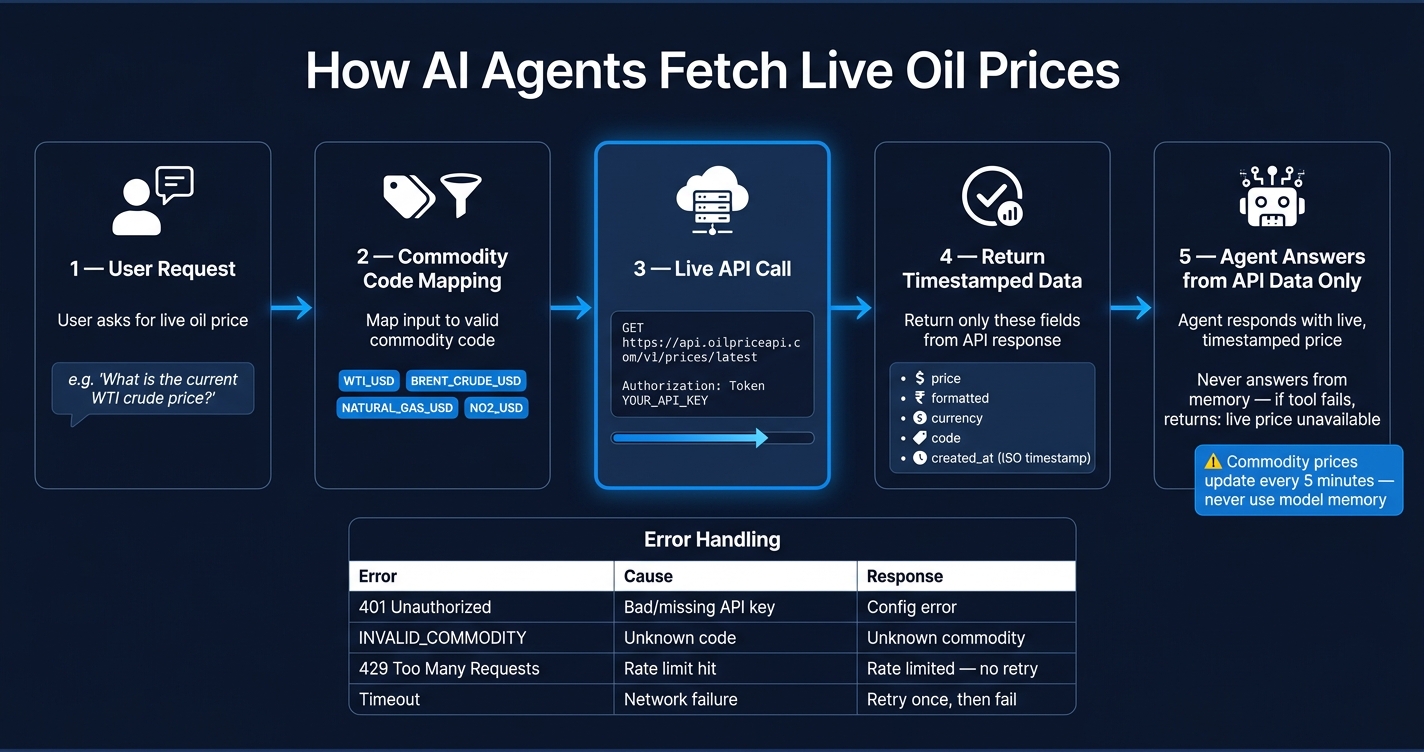
How AI Agents Fetch Live Oil Prices: Function Calling & MCP Flow
Quick Comparison
| Method | Where the logic runs | Reuse across clients | Auth handling |
|---|---|---|---|
| OpenAI function calling | App backend | Low | In app code |
| Anthropic tool use | App backend | Low | In app code |
| MCP server | MCP server | High | In MCP env vars |
Bottom line: the article is a setup guide for making AI agents use live, timestamped oil price data instead of memory. It focuses on one simple rule: for any price question, call the API first and answer from that result only.
sbb-itb-a92d0a3
1. Why AI agents need live oil price data
Commodity prices move during the trading day. Benchmarks like WTI Crude, Brent Crude, Natural Gas, and Ultra Low Sulfur Diesel update every 5 minutes. So if a user asks for a price, the agent should call a live tool right then and there.
The failure mode: stale or hallucinated prices
When an LLM can't call a live tool, it usually falls into one of two traps: it returns an old number from training data, or it spits out a price that sounds right but isn't tied to the market at all. Neither is safe in production.
A stale price can throw off any workflow that depends on what's happening now. The made-up price problem is even worse in a sneaky way. The model can return a number that looks normal for that commodity, even though no market event backs it up. There may be no warning, no disclaimer, and no sign anything went wrong, just a confident bad answer.
Sometimes the mistake gets expensive fast. Some natural gas benchmarks can trade at negative prices during pipeline congestion events. Without live data, an LLM would likely return a positive number in that case. That's the kind of error that can hit procurement teams where it hurts. The fix is simple: require a live tool call for every price request.
When live prices matter in production
In production, this risk tends to show up in four spots:
- Analyst assistants: need both prices fetched in the same call.
- Dashboards and internal portals: lose trust when the timestamp drifts.
- Fuel lookup and procurement tools: need current diesel or bunker fuel prices for marine and bunker fuel pricing.
- Automated reporting pipelines: must pull live data at generation time.
Across all of these, the rule stays the same: the agent is only as good as the data behind it. Call the API at request time, return the timestamped result, and never let the model make up a number.
Next, define the endpoint, auth header, and tool contract.
2. What you need before you start
Before you write the tool, make sure you have three things ready: an OilPriceAPI key, a backend runtime that can make HTTPS requests, and an agent framework that supports function calling, tool use, or MCP. Start with the API key and endpoint, then wrap that API call inside your tool.
Required endpoint and authentication
Use this endpoint for live spot prices:
GET https://api.oilpriceapi.com/v1/prices/latest
Authorization: Token YOUR_API_KEY
The auth header uses the prefix Token, not Bearer. If you send Bearer, the API can return a 401 Unauthorized error.
Your runtime only needs to support outbound HTTPS calls. Node.js 18+ includes native fetch. Python, Go, Ruby, and C# also work here. On the agent side, any framework that supports OpenAI-style function calling, Anthropic tool use, or MCP fits this setup.
For MCP, support includes:
- Claude Desktop
- Cursor
- VS Code with Cline
- Windsurf
Related implementation guides
If you want examples before wiring this up yourself, check the Python tutorial, Node.js tutorial, Excel guide, and Google Sheets guide.
Once those pieces are in place, you can define the tool input, request, and response shape.
3. Build a get_oil_price tool
Create a tight, single-purpose tool that fetches live oil prices on demand. The point is simple: the model should answer from API data, not from memory. In practice, that means wrapping one GET request inside a named function your agent framework can call whenever someone asks for a commodity price.
Tool contract: input, request, and return payload
The tool should accept one required parameter: a commodity_code string like WTI_USD, [BRENT_CRUDE_USD](https://blog.oilpriceapi.com/p/brent-crude-origin), or [NATURAL_GAS_USD](https://blog.oilpriceapi.com/p/indepth-analysis-natural-gas-henry-hub-live-price). Before you hit the API, map the user's wording to one of those valid codes.
Send this request:
GET https://api.oilpriceapi.com/v1/prices/latest
Use this header:
Authorization: Token YOUR_API_KEY
Then return only these fields from the API response:
priceformattedcurrencycodecreated_at
That created_at ISO timestamp matters. It gives the model a way to check how recent the price is without falling back on memory.
Once the request and response shape are locked in, add error handling before you connect the tool to the agent.
Basic error handling and guardrails
After defining the payload, set strict failure paths so the agent never makes up a price. Every failure case should return a structured unavailable response, not a silent null and not an empty object. Check that the response includes status: "success" and that the data object is neither empty nor null.
Set a short request timeout so the agent doesn't sit there forever during a network issue.
Catch these failures on purpose:
| Error | Cause | What the tool should return |
|---|---|---|
401 Unauthorized |
Invalid or missing API key | config error |
INVALID_COMMODITY |
Unrecognized commodity code | unknown commodity |
429 Too Many Requests |
Rate limit hit | rate limited |
| Connection timeout | Network failure | timeout |
A couple of guardrails matter here.
For 429 errors, don't retry right away. Report the rate limit to the agent and let it tell the user what happened. For timeouts, retry once after a short delay. If the second attempt fails too, return the timeout failure.
And add one more check before any request leaves your server: validate commodity_code against an allowed list.
4. Connect the tool with function calling, tool use, or MCP
Now it’s time to plug the same tool into your agent runtime. You’ve got three main paths here: OpenAI function calling, Anthropic tool use, and MCP.
The nice part? The API call itself doesn’t change. Only the wrapper does.
What changes is where the tool runs and how easy it is to reuse across apps.
Direct function calling
With the OpenAI function calling pattern, your application handles the whole request and response loop.
Here’s the flow: a user asks for a live oil price, the model emits a tool call with a commodity_code argument, your app fetches the data from the API, and then sends the result back to the model.
The same allowlist should stay in your tool schema. And one rule matters a lot here: the model should never answer from memory when a tool result is available.
Anthropic tool use and MCP wrapping
The MCP (Model Context Protocol) route moves that logic into a dedicated MCP server.
Instead of putting the API call inside each app, you expose get_oil_price on an MCP server. Then MCP-compatible clients like Claude Desktop, Cursor, VS Code with Cline, and Windsurf can reuse it without a custom integration for every single app.
That means the MCP server can handle the same mapping in one place for every client. Put simply, the same live-price tool can work across apps without rewriting the API wrapper each time.
For Claude Desktop or Cursor, the config follows this shape:
{
  "mcpServers": {
    "oilpriceapi": {
      "command": "<server-command>",
      "args": ["<args>"],
      "env": {
        "OILPRICEAPI_KEY": "your-api-key"
      }
    }
  }
}
The trade-offs are pretty straightforward:
| Direct Function Calling | Anthropic Tool Use | MCP Server | |
|---|---|---|---|
| Where logic runs | Application backend | Application backend | Dedicated MCP server |
| Reuse across clients | Low - one app only | Low - one app only | High - all MCP clients |
| Auth management | In app code (headers) | In app code (headers) | In MCP config (env vars) |
5. Return the live price and deploy
Format the final answer from API data only
Once the tool is wired in, keep the output tight. Return only the tool result. If the tool sends back data, show just these fields: price, formatted, currency, code, and created_at.
For U.S. currency display, use data.formatted as-is. For freshness, show created_at in U.S. date and time format so users can tell when the price was last updated.
Your system prompt should also be crystal clear on one point: if the tool returns an error or no data, say the live price is unavailable.
Test the tool path before going to production
Before you ship this, test the whole flow end to end.
- Tool-call test: Ask the agent for the current Brent oil price and make sure it calls
get_oil_priceinstead of replying from memory. - Field parsing test: Check that your code reads
data.price,data.formatted, anddata.created_atfrom the response. - Header test: Make sure the auth header uses
Token. - Error handling test: Simulate a timeout or a
429 Too Many Requestsresponse and confirm the agent returns "live price unavailable" instead of making up a price.
| Error | Likely Cause | Fix |
|---|---|---|
401 Unauthorized |
Wrong auth prefix or missing key | Use Authorization: Token YOUR_KEY |
INVALID_COMMODITY |
Unknown or misspelled code | Use standard codes like WTI_USD or BRENT_CRUDE_USD |
429 Too Many Requests |
Rate limit hit | Add backoff logic or retry later |
Enable debug logging so you can inspect requests, responses, and retries.
Once those checks pass, you can use the same setup for a Once those checks pass, you can use the same setup for a global oil market dashboard, an internal fuel cost portal, or a commodity lookup tool., an internal fuel cost portal, or a commodity lookup tool. If you want language-specific setup, the Python tutorial and Node.js tutorial walk through the integration, and the API documentation explains the request and response details. When you're ready, get a free API key at oilpriceapi.com.
FAQs
How do I map user prompts to valid commodity codes?
You don’t need to make users memorize specific codes. The MCP server and pre-built integrations automatically map natural-language prompts to internal API commodity codes.
For example, phrases like "brent oil" or "natural gas" can map to codes such as BRENT_CRUDE_USD or NATURAL_GAS_USD.
If you’re handling the logic yourself, just accept the raw strings or look them up in the documented commodity table.
When should I use MCP instead of direct function calling?
Use MCP in compatible AI environments when you want natural-language queries to work without manual code mapping. It’s handy for plain English requests like "brent oil", which can be mapped to the right API parameters automatically.
Choose direct function calling for custom applications when you want more control over the REST API setup and headers, or when your environment doesn’t support MCP.
What should my agent say if the live price tool fails?
If the live price tool fails, your agent should not make up data. It should plainly tell the user that it can’t get the live price right now and suggest trying again in a bit.
Developers should account for errors like rate limits, authentication failures, and timeouts so the agent responds with transparency. Use exponential backoff, and double-check your API credentials.