If you can’t prove who still has API access, who owns each key, and how fast bad access gets removed, your review has a gap.
I’d boil this article down to 10 checks: failed logins, token age, role changes, denied requests, inactive keys, report timing, review coverage, privileged access concentration, closure time, and evidence completeness. Together, they answer four plain questions: who has access, why they have it, whether access is too broad, and whether problems get fixed on time.
Here’s the short version:
- I’d flag keys older than 90 days
- I’d investigate denial rates above 5%
- I’d review failed logins above 10 per minute
- I’d mark keys with 90 days of no traffic for removal
- I’d check that 100% of active identities were reviewed
- I’d track whether fixes close within the set SLA
This is not about daily API performance. It’s about proof: owner, business reason, scope, status, logs, approvals, and closure.
Quick comparison
| Metric | What I’d check | Simple reason |
|---|---|---|
| Failed Login Count | Spikes in 401s | May show attack attempts or broken clients |
| Token Age | Keys older than 90 days | Old keys tend to linger |
| Role Change Count | Frequent or odd permission edits | May point to privilege creep |
| Denied Request Rate | 401/403/402/429 trends | Shows mismatch, abuse, or quota trouble |
| Inactive Keys | No use in 90 days | Idle access should not stay live |
| Report Timing | Late audit records | Late evidence creates gaps |
| Access Review Coverage | % of active identities reviewed | Skipped identities mean blind spots |
| Privileged Access Concentration | Who can create or rotate prod keys | Too many or too few creates risk |
| Remediation Closure Time | Time from finding to fix | Open issues leave exposure in place |
| Audit Evidence Completeness | Missing fields in logs | Weak records make review hard |
If I were running this review, I’d use these 10 metrics as a simple scorecard for every user, service account, token, and API key.
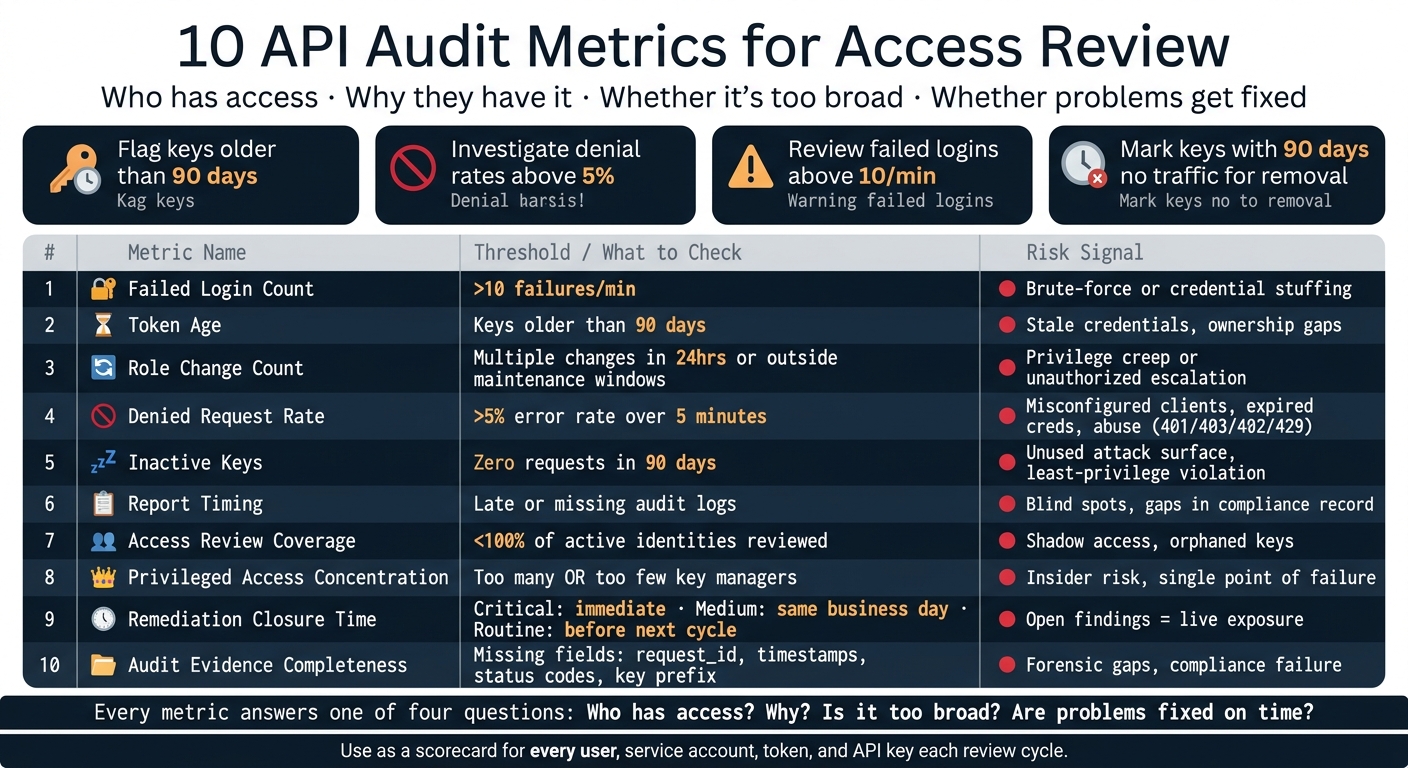
10 API Audit Metrics for Access Review: Quick Reference Scorecard
Measure What Matters: 14 Key API Success Metrics Explained!
sbb-itb-a92d0a3
What an Access Review Must Prove
An access review has one main job: show proof that every identity with access to your API still should have it, and only with the permissions it needs.
Put simply, reviewers are answering two things at once: should this identity still have access, and does it have only the access it needs? That means the review must prove who has access, why that access exists, and whether it still makes sense. That is different from day-to-day ops metrics. The proof comes from logs, inventories, approvals, and reports.
To do that, reviewers need a few concrete evidence sources working together.
- Authentication logs show who connected and whether the sign-in worked.
- Authorization logs show what they tried to do and whether the system allowed it.
- Role and group assignment records connect each identity to its current permissions.
- Key inventories and token metadata show whether a credential is active, scoped the right way, and not expired.
- Ticketing and approval records link each access grant to a business reason and a named approver.
- Audit reports bring everything into one review package, including findings, decisions, and remediation status.
Each source proves a different part of the story. Authentication logs prove who authenticated. Authorization logs prove what they were allowed to do. Key inventories prove what credentials exist and who owns them. Tickets prove why access was granted. Miss one of these, and the review has blind spots.
For each identity - whether it’s a human user, service account, or API key - every reviewer needs to verify four things: ownership, business need, least privilege, and timely remediation within SLA. The metrics below track those exact proof points.
1. Failed Login Count
What It Measures
Failed login count tracks unsuccessful authentication attempts tied to an API credential during the review period.
For a commodity data API, that means counting authentication failures that return HTTP 401 (Unauthorized) responses, along with any gateway-authentication errors linked to a specific credential and source IP. Reviewers use this number to tell the difference between actual access abuse and simple credential problems.
Why It Matters for Access Review
A spike can point to brute-force attempts, stale credentials after rotation, or a backend integration that’s gone off the rails. It can also flag a credential that no longer belongs in the inventory.
If authentication failures go above 10 per minute, that calls for immediate review. This metric helps show that each active credential still works only where it’s supposed to. That’s why log detail and request tracing matter so much here.
Primary Data Source
Use API gateway logs, authentication server audit trails, and backend error logs.
These logs should capture:
- Timestamp
- Endpoint
- Status code
- Source IP
request_id
Use response codes and request IDs to separate missing, invalid, and expired credentials without exposing the full key.
Reviewer Follow-Up Action
When the count goes up, dig into the logs to find the cause. Check whether failures cluster around a single IP or client, confirm that the key is still active, and verify that the Authorization header uses the right format.
Automated retries that ignore 401s can drive the count up and mask actual threats.
2. Token Age
What It Measures
After failed login checks, the next step is token age. This tells you how long an API key has been active based on its created_at timestamp.
Why does that matter? The longer a key exists, the more chances it has had to end up somewhere it shouldn’t - logs, email threads, pasted code, or old config files. Token age helps you judge whether an active key is still recent enough to keep using.
Why It Matters for Access Review
Production keys older than 90 days should be flagged. That 90-day rotation cycle is a common benchmark.
So during access review, any key past that mark isn’t just old. It may also point to a policy issue and an ownership gap. If nobody has rotated it, who is still watching it?
Primary Data Source
Use the account dashboard or /v1/account to check key age.
For OilpriceAPI, /v1/account returns:
created_atactiverevoked_attoken_hint
Taken together, these fields show age, activity, and revocation status without revealing the full secret.
Reviewer Follow-Up Action
If a token is past the policy limit, rotate it with a primary-secondary key process: create a new key, deploy it, confirm traffic, and then revoke the old key.
After that, verify that revoked_at is set. Log the rotation in the audit trail and the runbook. Then move to role changes to make sure the key still maps to the right permissions.
3. Role Change Count
What It Measures
Token age tells you how long a credential has been around. Role changes tell you something different: whether its access has shifted over time.
Role change count tracks permission changes during the review period, including tier changes, key-management privileges, data-scope changes, and IP or domain restrictions.
Why It Matters for Access Review
The big risk here is privilege creep. If permissions change often, or change in ways that seem out of place, an account may be picking up more access than it needs. That means reviewers need to check that every change was approved and documented, especially for service accounts with static roles. This is a least-privilege check, not just a quick pass through a change log.
A spike in changes can also point to unauthorized escalation or a broken provisioning flow. If you see multiple changes within 24 hours or changes outside maintenance windows, that deserves extra review.
Primary Data Source
Pull role-change records from IAM logs and audit trails. Then match each change to the related approval or ticket.
Reviewer Follow-Up Action
If a role change has no clear approval record, investigate it right away and remove any temporary access that was never taken back.
4. Denied Request Rate
What It Measures
When permissions change, denial patterns can tell you if access still lines up with actual use. The denied request rate measures the share of API calls rejected by security, policy, or quota controls. If that rate runs high, you may be looking at mismatched access, expired credentials, or abuse.
It helps to break denials out by code so you can separate auth, policy, quota, and throttling issues. Each code signals a different kind of access problem. Use 401 for auth failure, 403 for blocked access, 402 for quota exhaustion, and 429 for rate limiting.
Why It Matters for Access Review
A rising denial rate often points to misconfigured clients, expired credentials, or brute-force attempts. Use a 5% error rate over 5 minutes as a trigger for investigation.
You also need to separate access risk from throttling noise. A spike may confirm that aging or re-scoped credentials no longer match current access. And if 401s start coming from new sources, that can point to leaked credentials.
Primary Data Source
Pull this data from API gateway and request logs. Each record should include the HTTP status code, timestamp, endpoint, and request ID.
For commodity data APIs like OilpriceAPI, headers such as X-RateLimit-Remaining and X-RateLimit-Used give reviewers a clear read on when a key is getting close to its denial threshold. Log X-Request-Id on 401s so you can trace failures without exposing the key.
Reviewer Follow-Up Action
When denial rates spike, start with the status code behind the jump.
| Status Code | Denial Type | Follow-Up Action |
|---|---|---|
| 401 | Unauthorized | Verify token validity; rotate if the source is unfamiliar. |
| 403 | Forbidden | Check IP/domain rules and permissions. |
| 402 | Quota Exhausted | Review quota usage. |
| 429 | Rate Limited | Follow rate limiting best practices like adding backoff or honoring Retry-After. |
5. Inactive Keys
What It Measures
After denied requests, look at the keys with no traffic at all. Inactive keys are credentials that show no request activity during the review window. Flag any key with 90 days of zero requests.
Why It Matters for Access Review
An idle key is an access path that no one is watching. If it leaks, an attacker could pull commodity price data or eat up the monthly quota. It also goes against the principle of least privilege.
This is a bigger deal for commodity data APIs, where free-tier accounts may be capped at just 200 requests per month. A key that no one uses still carries risk, so it should not stay in the access inventory.
Primary Data Source
Use gateway logs, the key dashboard, and usage reports. Check logs that record timestamp, endpoint, status_code, and request_id. Review dashboard fields like active and revoked_at, along with usage metrics such as usage_this_month or X-RateLimit-Remaining.
For OilpriceAPI users, the /v1/account endpoint can help confirm key status during a review.
Reviewer Follow-Up Action
When you identify an inactive key, revoke it. Before you do, document any legacy dependency and the rollback step. It also helps to rotate keys every quarter so idle keys don't stack up over time.
6. Report Timing
What It Measures
After access is granted, reviewers need proof that audit evidence still shows up on time. Report timing checks whether audit logs and review reports are delivered by the required deadline. To verify this, reviewers compare audit-log timestamps with the compliance calendar and confirm that each delivery lines up with the expected schedule.
Why It Matters for Access Review
Late reports create blind spots. They can also push unresolved access issues into the next review cycle, which makes follow-up harder and leaves gaps in the record.
Primary Data Source
Use gateway logs, JSON metadata, and report timestamps. Gateway logs provide UTC timestamps, request IDs, and status codes. JSON response metadata can include created_at fields and coverage_status flags.
Taken together, these records show whether audit evidence arrived within the required window. This is the paper trail reviewers rely on when they need to confirm timing, not just assume it.
Reviewer Follow-Up Action
If reports are late or missing, alert on the missed deadline, document the delay, and log the remediation date. Also set a documented reporting schedule and check that logging systems are running on time. That timing record should match the review's coverage data.
7. Access Review Coverage
What It Measures
Once you’ve looked at timing, the next step is completeness: did the review include every active identity?
Access review coverage measures the percentage of active identities and roles checked during the audit cycle. The formula is simple: divide the number of reviewed identities by the total number of active identities at the start of the cycle, then multiply by 100.
Why It Matters for Access Review
Partial coverage creates blind spots.
A former employee’s orphaned key or a retired service account can stay active and turn into a quiet way back into backend systems. With commodity data APIs like OilpriceAPI, a forgotten development key left in production doesn’t just create a security problem. It can also burn through your quota.
This is why coverage isn’t just a paperwork metric. If even one live key gets skipped, the review can look clean on paper while missing the one thing that matters.
Primary Data Source
Start with the API provider’s account management system. For OilpriceAPI, the /v1/account endpoint lists API keys, including each key’s id, name, and active status. Use the active entries as the denominator in your coverage formula.
Then cross-check that list against secret managers and gateway logs. That helps you spot keys that exist outside normal channels, which is often where trouble starts.
Coverage only means anything when the numerator and denominator come from the same inventory.
| Component | Data Source | Role in Calculation |
|---|---|---|
| API Keys | /v1/account endpoint (api_keys array) |
Denominator (Total Active) |
| User Accounts | Dashboard → Team/Account Settings | Denominator (Total Active) |
| Reviewed | Audit Log / Reviewer Sign-off Sheet | Numerator (Reviewed) |
| Coverage | (Reviewed ÷ Total Active Identities) × 100 | Final Metric |
Reviewer Follow-Up Action
If coverage comes in low, reconcile the provider dashboard, secret manager, and gateway logs. Use X-Request-Id to trace active keys that never made it onto the review list.
Any unverified key or permission that no longer maps to a business need should be revoked. A clean coverage score doesn’t help much if a live key was never reviewed in the first place.
8. Privileged Access Concentration
What It Measures
Coverage tells you who got reviewed. Concentration tells you who holds the keys to production.
Privileged access concentration measures how many identities can generate or rotate production keys. If too few people control that access, you get a single point of failure and more insider-risk exposure. If too many people have it, the attack surface gets bigger.
Why It Matters for Access Review
With commodity data APIs like OilpriceAPI, production keys (opa_live_*) are live credentials. If someone misuses them, quota pressure can climb fast. Keeping the number of privileged identities low - and making sure each one has a clear reason for that access - is a direct least-privilege control.
Primary Data Source
Use these sources to assess concentration:
- API key management dashboard - shows who can generate or rotate production keys
/v1/accountendpoint - shows active keys, descriptive names, andtoken_hintfor log matching without exposing the secret- API gateway logs - show request volume per key and unusual usage patterns
Reviewer Follow-Up Action
Start with separation of duties. The person who manages API keys should not be the same person who audits usage logs. That simple split can help catch problems before they snowball.
Then check whether each privileged key holder still needs that level of access for their current role. People change teams, projects shift, and access has a habit of sticking around longer than it should.
Rotate production keys on a regular schedule, and keep development work on a separate development key. Watch for unusually high request volume and review it right away, since that can point to credential sharing or too much automation tied to one privileged key.
Log any excess privilege for remediation tracking.
9. Remediation Closure Time
After you spot excess access, the next step is simple: track how fast the issue gets closed.
What It Measures
Remediation closure time measures the span between a finding and its verified fix. For access reviews, that includes things like revoked keys, rotated keys, and excess roles.
Put plainly, this metric shows whether an access-review finding turns into an actual fix.
Why It Matters for Access Review
A leaked production key (opa_live_*) can burn production quota and lead to service exhaustion. If that key shows up in a public repository, rotate it at once.
| Risk Level | Scenario | Target Closure Time |
|---|---|---|
| Critical | Leaked API key in a public repo | Immediate |
| Medium | Finding triggered by 401/403 responses |
Within the same business day |
| Routine | Minor access-review finding | Before the next review cycle |
Primary Data Source
Use the API key dashboard, audit logs, and incident records. Compare the created_at and revoked_at timestamps to see when the issue was found and when it was fixed.
Reviewer Follow-Up Action
When you review a closed finding, check that the revoked_at timestamp in the API metadata matches the incident log. Then confirm in the dashboard that the key or access item is no longer active.
If a finding stays open past its SLA, escalate it to the security lead or compliance officer right away. While it remains open, make sure temporary controls such as IP restrictions or lower rate limits are in place to limit exposure.
10. Audit Evidence Completeness
What It Measures
Once you’ve checked coverage, the next step is simpler: is the evidence complete enough to rebuild what happened? Audit evidence completeness looks at whether logs include enough detail to show who accessed the API, what they did, and when they did it.
Why It Matters for Access Review
Gaps in evidence create compliance risk and security misconfigurations. If X-Request-Id values are missing, it becomes much harder to trace one event across backend systems. And empty-body 404s can hide denied requests.
Primary Data Source
The table below lays out the five evidence categories a reviewer should check and what each one needs:
| Evidence Category | Required Data Points | Why It Matters |
|---|---|---|
| Identity | API Key Prefix, Account Email, IP Address | Identifies the specific entity or system accessing the API |
| Activity | Endpoint, Request Params, HTTP Method | Defines the scope of data accessed or actions taken |
| Temporal | UTC Timestamp, System Timestamp | Establishes a chronological timeline of events |
| Outcome | HTTP Status Code, Error Message, request_id |
Proves whether access was granted or denied and why |
| Administrative | Key Rotation Date, Revocation Timestamp | Tracks credential changes and access rights |
It also helps to cross-check internal logs against the provider dashboard and X-RateLimit-Used / X-RateLimit-Remaining. That gives reviewers a way to reconcile logged activity with actual usage.
Reviewer Follow-Up Action
Use X-Request-Id to match missing client-side records with server logs. Then check that logging covers all /v1/ endpoints, records both status and URL for empty responses, and keeps the key prefix visible while masking the full secret. You’ll also want to confirm that sanitization does not remove the key prefix.
Those fields are the basis for scoring completeness in the quick-reference table below.
Quick Reference Table for Reviewers
Use this table to score each identity fast during monthly or quarterly reviews. Each row lines up with one of the 10 metrics covered in this article, so security, compliance, and engineering teams can work through a review cycle without bouncing between sections.
| Metric | What It Measures | Why It Matters | Primary Data Source | Reviewer Follow-Up Action |
|---|---|---|---|---|
| 1. Failed Login Count | Number of failed authentication attempts | Helps spot brute-force attacks or credential stuffing | API Gateway / Auth Logs | Investigate source IP; block if malicious |
| 2. Token Age | Days since key creation or last rotation | Older keys create more exposure | Key Inventory / IAM Records | Trigger mandatory rotation for keys older than 90 days |
| 3. Role Change Count | Frequency of permission or scope updates | Helps find possible unauthorized privilege escalation | IAM / RBAC Audit Logs | Cross-reference changes against approved tickets |
| 4. Denied Request Rate | % of 401, 403, 402, or 429 responses | Can point to misconfiguration or active probing | API Gateway Logs | Investigate targeted endpoints; adjust rate limits |
| 5. Inactive Keys | Keys with 90 days of zero requests | Cuts unused credentials that expand the attack surface | Usage Monitoring Logs | Notify owner; revoke if no longer needed |
| 6. Report Timing | Adherence to the audit schedule | Makes sure security gaps are found inside review cycles | Compliance Records | Escalate missed deadlines to the security lead |
| 7. Access Review Coverage | % of keys and users included in the review | Keeps "shadow" access from slipping by | IAM Records / User Directory | Schedule immediate review for any skipped assets |
| 8. Privileged Access Concentration | Count of identities that can generate or rotate production keys | Shrinks blast radius if one key is compromised | RBAC Configuration | Downgrade to Read-Only where full access isn't required |
| 9. Remediation Closure Time | Time elapsed between finding a risk and closing it | Shows how fast the team reduces risk | Ticketing System (e.g., Jira) | Expedite high-risk revocations; escalate overdue items |
| 10. Audit Evidence Completeness | Presence of required metadata fields in logs | Needed for forensic investigations and compliance | Audit Trails / API Logs | Update logging config to capture any missing fields |
Put extra attention on identities flagged by more than one metric in the same review cycle.
Use these scores to spot the highest-risk access patterns in the red flags below.
Red Flags to Watch in Commodity Data API Access Reviews
The metrics above show trends. This section is about the patterns that should trigger immediate escalation.
A sudden jump in failed logins from one client ID or service account can point to brute-force activity or credential stuffing. The risk gets worse when those failures are followed by a successful login from the same account. That sequence suggests the credential may have been compromised and should no longer be trusted. And if that same key is old and still has broad access, the risk climbs fast.
Old tokens are another clear warning sign. A production key that is more than 90 days old and still pulling real-time Natural Gas or Gold data builds risk over time. If that same key works across dev, staging, and production, the blast radius gets much larger. Put plainly: if nobody rotated it when they should have, ownership is already shaky.
Repeated 401 or 403 responses on write endpoints from read-only integrations are another pattern to take seriously. That can mean a client is set up wrong, or someone is probing for access they shouldn’t have. A denial rate above 5% on write endpoints during any one-hour window is a reasonable point to start digging in. If that pattern matches a recent role change, the access path needs a manual review.
Role changes near a market event deserve close attention. If a service account was moved into a privileged pricing role and there’s no matching change ticket, treat it as high risk until an owner gives written justification. Unapproved elevations with no ticket, no approval, and no named owner are the clearest sign of privilege creep. If there’s no current business need, the review fails.
The worst cases tend to stack up. A long-idle key that suddenly starts pulling large volumes of historical price data at high frequency, with no business request on file, is one of the highest-risk patterns in this review. If that happens while a revoke decision is overdue and still sitting untouched in the ticketing system, the process has missed a required closeout. Escalate revocations that remain open more than 24 hours after sign-off.
Conclusion
Once you’ve confirmed the evidence is complete, there’s one last check: can the review process be repeated the same way every time?
Access reviews only stand up when they rely on repeatable, measurable checks instead of a one-off signoff. These 10 metrics help make access reviews repeatable, measurable, and audit-ready.
Used together, these metrics show gaps that a single metric can miss, like stale access, excess privilege, and missing evidence. But that only happens when every cycle follows the same scoring and reporting standard. Track review completion, remediation speed, and evidence quality in each cycle. When the format stays the same, reviewers can compare one cycle to the next without rebuilding the process. Use the same review package each time to keep access reviews audit-ready.
FAQs
Which metrics should we prioritize first?
Start with error rate and system uptime. Error rate helps surface unauthorized access attempts and setup issues, such as 401 and 403 errors, while uptime confirms the service stays available.
After that, add performance metrics like average response time and usage patterns. These benchmarks help you set alert thresholds and support compliance and reliable user access.
How often should we run an API access review?
Use a schedule that blends automation with human review:
- Daily automated scans
- Weekly manual reviews
- Monthly audits
- At least quarterly security audits
This layered setup helps you catch issues fast, spot patterns over time, and keep access controls working through both real-time monitoring and human judgment.
What evidence do auditors usually expect to see?
Auditors usually want proof that your system is secure, follows the rules, and runs the way it should.
That proof often comes down to a few concrete things: tamper-proof audit logs that show timestamps, user actions, and system changes; clear documentation for authentication methods like OAuth 2.0 or API key management; monitoring records that flag suspicious traffic, failed logins, and unusual request patterns; and data retention policies, along with evidence of regular scheduled audits.