A valid token should never mean full API access. I’d set RBAC so each request passes 4 checks in order: identity, role/scope check, route rule, and request limits like date range or granularity.
Here’s the short version:
- Use 3 core roles:
admin,analyst, andapp - Deny by default: allow only the routes and methods each role needs
- Map rules by method + route: like
GET /v1/prices/latestorPOST /v1/admin/users - Add limits for heavy endpoints: for example, history access by days and granularity
- Keep checks in one shared layer: middleware, gateway, or policy engine
- Return the right status codes:
401for missing or bad tokens,403for signed-in callers who lack access - Log denied requests: include request ID, subject, route, scope, and denial reason
- Keep app tokens narrow and short-lived: one service account per integration is a good rule
If I were setting this up for a commodity data API, I’d give:
- Admins access to users, keys, quotas, usage, and audit logs
- Analysts read-only access to current prices, history, and selected metadata
- Apps limited machine access to only the data endpoints they need
A few hard limits matter too. In the article, history access is not just “yes or no.” It also depends on how much data a caller can pull. One example policy allows analysts up to 5 years of daily or hourly history, while app roles get only 90 days of daily data.
Quick comparison
| Role | Main use | Price data | History data | Usage/account | Keys/audit |
|---|---|---|---|---|---|
| Admin | Human admin work | Yes | Yes, longest range | Full access | Full access |
| Analyst | Human read-only use | Yes | Yes, limited by range/granularity | Limited summary | No |
| App | Service-to-service calls | Yes, scoped | Yes, tighter limits | None or self-only | No |
The main point is simple: separate who the caller is from what the caller can do, then enforce that rule set in one place so access stays clear as the API grows.
Role-Based Access Control (RBAC) explained with a Real Node.js Example
sbb-itb-a92d0a3
Design Roles for Admins, Analysts, and Apps
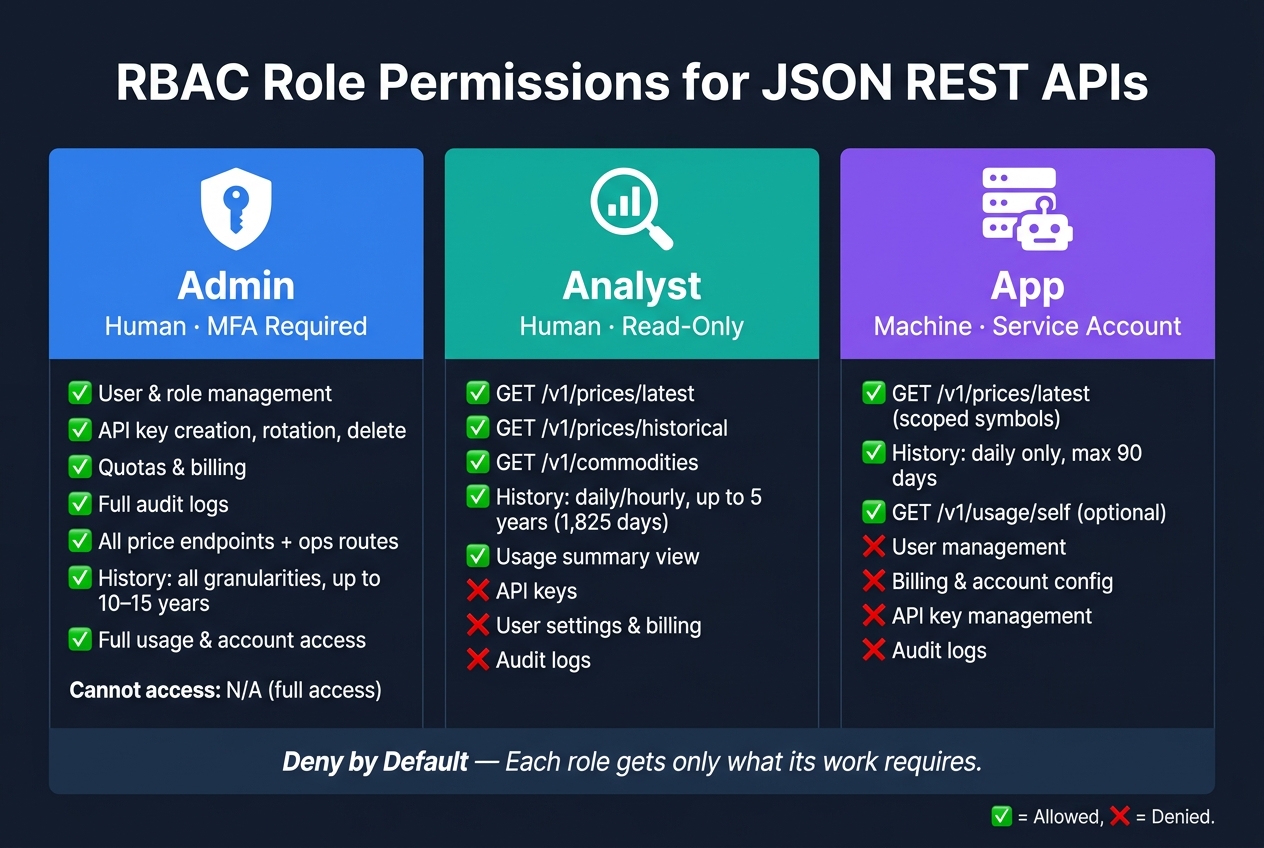
RBAC Roles for JSON REST APIs: Admin vs Analyst vs App Permissions
A compact RBAC model usually works best with three core roles: admin, analyst, and app. Each one should have a clear job and clear limits.
Use a deny-by-default setup. That means admins, analysts, and apps get only the access their work needs. Keeping human roles separate from app roles also cuts risk. If an app gets compromised, it shouldn't be able to change user permissions or subscription tiers. And when you add a new commodity or symbol, you shouldn't need a new role. Existing data-read scopes can handle new symbols without changing the role model.
Admin Role: Manage Users, Permissions, and Account Settings
Admins handle users, keys, quotas, and audit logs. For a commodity price API, that means an admin decides who can access which data and can shut down a compromised service account credential right away.
You also want a clear paper trail. Log key creation, role changes, and quota updates so every access change is traceable. Because admin permissions carry a lot of power, human admins should use MFA, and their sessions should be short-lived.
Analyst Role: Read Prices and History Without Account Control
The analyst role is read-only.
An analyst at a trading desk or hedge fund may need current prices, historical time-series data, and selected metadata. That includes endpoints such as GET /v1/prices/latest, GET /v1/prices/historical?symbol=WTI&start_date=2026-08-01&end_date=2026-08-07&granularity=daily, and GET /v1/commodities. But that same analyst should not be able to manage API keys, user settings, or billing.
If an analyst account is compromised, the damage stays limited to reads. Some setups also apply rate limits or time-range limits to match licensing terms, without making a separate role for every access tier.
App Role: Service-to-Service Access With Narrow Scopes
App roles are for service-to-service access. A dashboard, ETL job, or alerting system should use a server-side API key, never a client-side secret. Use a separately named development key so you can rotate it without touching production.
Each app role should get scopes tied to exactly what it needs. Think of it like giving each service its own lane instead of handing over the whole highway.
- A live dashboard showing Brent Crude and WTI prices might use
prices.read.currentandprices.read.metadata - A nightly ETL job loading a data warehouse might use
prices.read.historywith daily granularity - An alerting service watching Natural Gas thresholds might use
prices.read.currentonly
None of these app roles should call /v1/account or /v1/api-keys. If an app tries to hit an out-of-scope endpoint, the RBAC layer should return 403 Forbidden and log the denial with the service account identity.
| Role | Access Type | Key Permissions | Cannot Access |
|---|---|---|---|
| Admin | Human (MFA required) | User and role management, API key management, quotas, audit logs | N/A |
| Analyst | Human (read-only) | Current prices, historical time series, metadata | API keys, user settings, billing |
| App | Machine (service account / API key) | Scoped GET access to specific data endpoints |
User management, billing, account configuration |
Next, map these roles to exact routes and methods.
Map Permissions to Price, History, and Usage Endpoints
Once your roles are set, the next move is to turn them into clear endpoint rules. Keep those rules in one place - a policy file, rules engine, or API gateway - so a single update applies across every controller. Think of it as a route-policy map: role, route, and query limits decide whether a request is allowed or blocked. After roles are locked in, tie them to exact routes and query limits.
Price Endpoints: Current Market Data Access
Price endpoints usually get hit the most in a commodity API. In OilpriceAPI, that includes routes like GET /v1/prices/latest, which returns current market quotes for Brent Crude, WTI, Natural Gas, and Gold. Analyst and app roles should have GET-only access here.
A typical analyst response looks like this:
{
  "symbol": "CL",
  "currency": "USD",
  "price": 83.25,
  "timestamp": "2026-08-07T14:30:00Z",
  "price_formatted": "$83.25"
}
Admins can also reach ops routes like GET /v1/prices/sources and GET /v1/system/health. App roles should be locked down more tightly. In practice, that means scoping them to specific symbols with query params such as ?symbols=CL,NG plus a narrow prices:read-style scope.
The nice part? You don't need to touch the price handler to make this work. Middleware checks the request first and blocks anything outside the rule set before it gets near business logic. Use that same setup for history and usage routes too.
History Endpoints: Time-Series Permissions by Range and Granularity
History endpoints are heavier than current price lookups, so RBAC has to control more than who can call them. It also needs to control how much data they can pull. The interval parameter can request raw, 1h, daily, weekly, or monthly aggregations, which makes per-role granularity limits a smart guardrail.
A practical setup looks like this: analysts can query up to 5 years of daily or hourly data, app roles are capped at 90 days of daily data only, and admins get the longest retention window - up to 10–15 years for audit or billing work. Middleware should check both the date range and the requested granularity against each role's limits before the handler runs. That stops an app role from pulling a multi-year dataset in one shot, whether by mistake or on purpose.
In a central config, this works better as a constraint object than a plain allow/deny rule:
{
  "analyst": { "history": { "methods": ["GET"], "max_days": 1825, "allowed_granularity": ["daily", "hourly"] } },
  "app":     { "history": { "methods": ["GET"], "max_days": 90,   "allowed_granularity": ["daily"] } }
}
Enforce those checks before the handler executes.
Usage Endpoints: Quotas, Account Activity, and Audit Visibility
Usage endpoints expose account metadata that you don't want floating around more than needed: request counts, remaining quota, subscription tier, and API key activity.
Admins get full access to GET /v1/usage, GET /v1/usage/daily, GET /v1/keys, and GET /v1/audit/logs. Analysts can get a limited summary - enough to see overall consumption without showing billing details or key material. App roles usually get no usage access at all, or just GET /v1/usage/self so they can handle rate-limit backoff. Keeping detailed usage routes admin-only is the safer starting point because they expose consumption patterns and billing details.
Here’s the full permission matrix across the three endpoint groups:
| Endpoint Category | Admin | Analyst | App |
|---|---|---|---|
Price (/v1/prices/latest) |
GET + ops routes | GET only | GET only, scoped symbols |
History (/v1/prices/history) |
GET, all granularities, longest retention | GET, daily/hourly, moderate retention | GET, daily only, shorter window |
Usage / Account (/v1/usage, /v1/usage/daily, /v1/account) |
Full access | Summary view only | No access, or self-only |
Key Management (/v1/keys) |
Create, rotate, delete | No access | No access |
Audit Logs (/v1/audit/logs) |
Full access | No access | No access |
This matrix only matters if a leaked credential has limited blast radius. That’s why enforcement needs to happen in middleware, gateway rules, and token claims - not just on paper.
Apply RBAC in Common JSON REST API Patterns
The permission matrix from the last section only matters if your app checks it at the right time. In practice, that means picking one place in the request flow for authorization and keeping the logic there. If checks get spread across controllers, they drift. One route gets updated, another gets missed, and now your API behaves differently depending on which path a caller hits.
Middleware and Gateway Checks by Route and Method
After you define roles and endpoint rules, put enforcement in a shared layer. Use shared middleware or the API gateway, not scattered checks inside route handlers.
The usual setup is simple: keep a route-to-permission map. The middleware normalizes the request path, matches it with the HTTP method, and finds the permission that route needs. If the token claims match, the request moves on. If they don't, the request stops with a 403 Forbidden before any business logic runs. That one move helps stop controller-level drift.
It also makes policy changes much easier. Update the map once, and the rule takes effect everywhere.
Token Claims, Scopes, and Service Account Roles
That policy layer only works if token claims stay small and predictable. JWTs should include only what RBAC needs: sub, account_id, roles, scopes, and service_account. Here's an example of a service account token for a dashboard app that pulls real-time prices:
{
  "sub": "svc_dashboard_01",
  "account_id": "acct_789",
  "roles": ["service"],
  "scopes": ["prices.read"],
  "service_account": true,
  "iat": 1733611200,
  "exp": 1733611800,
  "iss": "https://auth.example.com",
  "aud": "commodity-api"
}
A couple of details matter here. The token is short-lived, and it only has prices.read. That's on purpose. If a credential leaks, a short window and a narrow scope keep the blast radius small.
For machine-to-machine connections, use one service account for each integration. That way, if one integration goes off the rails or a key gets exposed, you can revoke that one account without breaking everything else.
Denied Requests, Logs, and Audit Trails
Authorization decisions need to show up in both the API response and the audit log. Log every failed authorization attempt in structured JSON so teams can search and filter it later. Include the timestamp, request ID, account ID, subject, HTTP method, normalized route, required scope, provided scopes, and the reason for denial.
{
  "timestamp": "2026-08-07T14:32:10Z",
  "request_id": "req_abc123",
  "account_id": "acct_789",
  "sub": "user_12345",
  "service_account": false,
  "method": "POST",
  "route": "/example/history/export",
  "required_scope": "history.export",
  "provided_scopes": ["prices.read", "history.read"],
  "outcome": "denied",
  "reason": "insufficient_scope"
}
For the response body, be clear without saying too much. Return 401 Unauthorized when the token is missing or invalid. Return 403 Forbidden when the caller is signed in but doesn't have the needed scope. Add a required_scope field so developers can see what's missing, but don't leak internal role names or other behind-the-scenes details.
For sensitive endpoints like GET /v1/usage and bulk history exports, log successful access too. Record who accessed the data, which parameters they used, such as date range and symbol, and a volume marker like record count. That's often where odd access patterns start to show up.
Implementation Practices, Pitfalls, and Final Takeaways
Practices That Keep RBAC Maintainable
Once your roles and endpoint rules are in place, the next job is keeping the system steady as the API grows.
The best RBAC setups do one thing very well: they keep every access decision in one place. That can be a gateway, a policy engine, or shared middleware. The upside is simple. You make one policy change instead of editing a pile of controllers.
Permission naming also matters more than teams often think. A format like resource.action.scope - for example, price.read.current, price.read.history.daily, and usage.read.account - makes each permission easy to read at a glance. When new endpoints show up, the same pattern can keep going instead of turning into a mess of one-off labels.
It also helps to turn your role-to-endpoint map into a test matrix. List the three roles against your endpoint groups, then mark each cell as allowed, denied, or conditional. From there, build both positive and negative tests. Review those permissions every quarter so privilege creep doesn't sneak in.
Common Mistakes That Weaken API Authorization
These problems tend to show up right after the first version of the policy ships.
One of the biggest is role explosion. It usually starts small. A team adds region-specific or legacy-specific role variants instead of sticking with a tight base set. A few months later, nobody is fully sure what each role can do. Even a small permission change can mean updating dozens of role definitions. Keep roles tied to steady responsibilities like Admin, Analyst, and App. If you need more detail, use claims or query parameters.
Another common problem is giving service accounts the same power as Admin users. App tokens are often long-lived and stored in config files, which makes them attractive targets across price, history, and usage endpoints. Keep app token scopes narrow, and leave account-management access to human admins using MFA.
Hidden controller exceptions can do just as much damage. If access checks live inline inside controllers, bypasses are much easier to miss. Ban that pattern, then back it up with static analysis and strict code review.
Conclusion: What a Strong RBAC Model Should Achieve
A strong RBAC model separates identity from permission, keeps roles small, maps permissions clearly, and enforces rules through one shared layer. That keeps current prices, history, and usage under the same access rules. It also turns access control into something you can inspect, audit, and change with confidence instead of something you scramble to patch after an incident.
FAQs
How does RBAC differ from API scopes?
RBAC assigns permissions based on a user’s role in an organization, like admin or analyst, so access lines up with that person’s job.
API scopes work a bit differently. They’re token-based permissions that spell out which actions or resources a client can use. Put simply, RBAC controls what the user can access, while scopes control what the token can do.
When should I use 401 vs 403?
Use 401 Unauthorized when the API key is missing or invalid. In plain English, the request failed authentication. The first thing to check is your Authorization header and whether it follows the expected format.
Use 403 Forbidden when the request is authenticated, but the account still doesn't have permission to access that resource. In OilpriceAPI, this usually means your subscription tier doesn't include the premium endpoint you're trying to use, so review your account access.
How do I avoid role explosion?
Base roles on what people or systems need to do, not on each person or each API endpoint. That usually means broad roles like Admin, Analyst, or App instead of spinning up a new role for every little permission mix.
A simple role setup is easier to manage, and it keeps access control from turning into a mess as your API grows.
It also helps to use a hierarchical or additive model. In plain English, higher-level roles can inherit common permissions instead of forcing you to map the same access rules again and again.
As usage expands, review your roles on a regular basis. If two roles do almost the same thing, merge them. That keeps permission mapping lean and makes the whole system easier to maintain.